
Zomato Receipt Generator
Create Zomato-style food delivery receipts with order ID, restaurant details, itemized menu items, delivery charges, GST breakdown, and FSSAI number. Free online receipt maker.
Generate Your Zomato Receipt
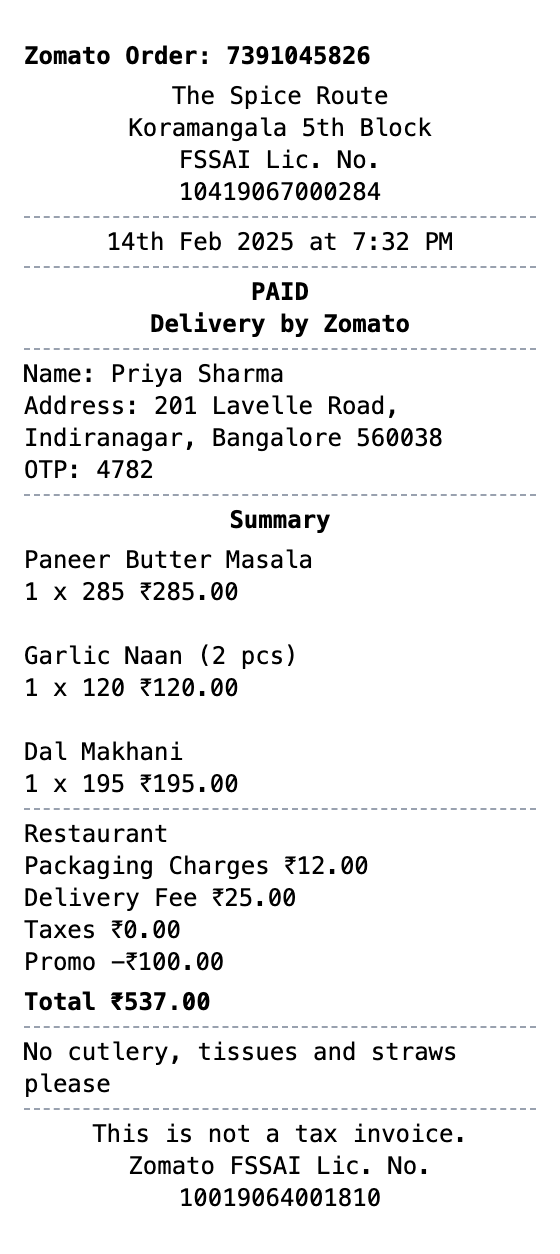
Zero to Zomato Receipt in 60 Seconds
Pick a template, make it your own, and download a zomato receipt that looks the part. No design skills needed.
Order ID & Restaurant Info
Display Zomato order number, restaurant name, location, and FSSAI license details.
Delivery Details
Include customer name, delivery address, and OTP code matching Zomato format.
Itemized Food Order
List all ordered items with quantities and individual prices in rupees.
Fee & Tax Breakdown
Show packaging charges, delivery fee, taxes, and promotional discounts separately.
FSSAI Compliance
Include FSSAI license numbers for both the restaurant and Zomato as required by Indian food safety regulations.
Indian Receipt Format
Matches the authentic Zomato delivery receipt layout with INR currency and Indian address formatting.
Making Your Zomato Receipt, Step by Step
Pick, edit, download. That's the entire workflow.
Step 1:
Pick your template
Step 2:
Fill in the details
Step 3:
Export your receipt
The Parts of a Zomato Receipt, Explained
Worth knowing before you build your own version.
- Order ID
- The long numeric order number Zomato assigns to every delivery, used for support and refund requests.
- Restaurant details
- The restaurant name and locality, since the bill comes from the restaurant while Zomato handles delivery and payment.
- Item lines
- Each dish with quantity and price in INR, including any customizations.
- Charges block
- The item total plus delivery fee, packaging or restaurant charges, platform fee, and any promo discount applied.
- GST lines
- Indian receipts split GST into CGST and SGST components, each typically 2.5% on restaurant orders.
- Payment and delivery info
- The payment method (UPI, card, or cash on delivery) and the delivery address and time.
Common Uses for a Zomato Receipt
A few of the ways people put this template to work
Expense Reports
Document Zomato food delivery orders for corporate expense reimbursement
Business Meals
Create receipts for business meal delivery orders for accounting purposes
Budget Tracking
Keep organized records of food delivery spending for monthly budgets
App Mockups
Generate realistic Zomato receipt mockups for food delivery app designs
Training Materials
Use sample receipts for delivery operations training or documentation
Restaurant Partners
Reference receipt format for restaurants partnering with food delivery platforms
Zomato Receipt FAQs
Everything else you might want to know
What details are on a Zomato receipt?
A Zomato receipt includes the order ID, restaurant name and FSSAI license, date and time, customer name and delivery address with OTP, itemized food items with prices, packaging charges, delivery fee, taxes, promotional discounts, and the total amount in Indian Rupees.
Can I customize the food items and prices?
Yes, you can edit all food items, quantities, prices, delivery charges, taxes, and discount amounts. The layout uses customizable text sections so you can match any Zomato order format.
Does this include GST and FSSAI details?
Yes, the template includes FSSAI license number fields for both the restaurant and Zomato platform, and you can add CGST/SGST tax breakdowns in the charges section to match Indian tax invoice requirements.
What exactly is a zomato receipt?
A Zomato receipt is a delivery order confirmation issued when food is ordered through Zomato, one of India's largest food delivery platforms. It includes the Zomato order number, restaurant name and FSSAI license, delivery address with OTP, itemized food order with prices in Indian Rupees, and a breakdown of packaging charges, delivery fees, taxes, and any promotional discounts applied.
Why do you need a zomato receipt?
Zomato receipts are essential for tracking food delivery expenses, filing reimbursement claims for business meals, and maintaining records of online food orders. They serve as proof of purchase for order disputes, help with monthly budget tracking, and are useful for corporate expense reporting where itemized food delivery bills are required.
What are the key fields on a zomato receipt?
Zomato order ID number • Restaurant name, location, and FSSAI license • Order date and time • Customer name, delivery address, and OTP • Itemized food items with quantities and prices • Packaging charges, delivery fee, taxes, and promo discounts • Total amount in Indian Rupees (₹) • Zomato FSSAI license number
Getting the details right on your zomato receipt
Use the thermal paper style for an authentic printed receipt look • Include realistic FSSAI license numbers for both restaurant and platform • Add an OTP code in the delivery details for authenticity • Show the promo discount as a negative value to match real Zomato receipts
Is MakeMyReceipt free to use?
Yes. You can build and customize receipts for free with no sign-up required. Watermark-free exports and saved receipts are available with Pro.
What file formats can I export?
You can export your receipts as PNG (high-quality images), PDF (print-ready documents), or JPEG (compressed images for smaller file sizes).
Related Receipt Templates

Convenience Store Receipt
Standard retail receipt with items, tax, and payment

Pharmacy Receipt
Pharmacy receipt with Rx info and insurance details
Auto Service Receipt
Auto shop receipt with services, parts, and labor

Restaurant Receipt
Restaurant receipt with items, tax, and tip line
Service Receipt
Service invoice with description, hours, and rate