
Convenience Store Receipt Generator
Create a custom convenience store receipt with our free generator. Customize items, tax, totals, and more. Perfect for small businesses and mockups.
Start Your Convenience Store Receipt
Built to Get the Details Right
No design software and no learning curve. Fill in your details and download.
Drag & Drop Builder
Arrange your receipt sections however you like - move items, totals, and store info around with a simple drag.
Real-time Preview
See your convenience store receipt update instantly as you add products, adjust prices, or change the layout.
Multiple Export Formats
Download your receipt as a PNG for quick sharing, PDF for printing, or JPEG for smaller file sizes.
Custom Styling
Add your store name, tweak the fonts, and make it look exactly like receipts from your favorite corner store.
Barcode & QR Support
Include scannable barcodes for transaction tracking or QR codes linking to your store's website or loyalty program.
Paper Styles
Choose thermal paper for that authentic register look, or white paper for a cleaner appearance.
How to Generate Your Convenience Store Receipt
Three simple steps to generate professional receipts
Step 1:
Open the template
Step 2:
Edit every field
Step 3:
Download your file
When You Might Need One
From bookkeeping to mockups, it covers a lot of ground
Replace Lost Receipts
Recreate receipts for items purchased at corner stores when the original was lost
Expense Tracking
Document convenience store purchases for business expense reports
Tax Records
Keep organized purchase records for tax deductions and filings
POS Replacement
Generate receipts when your store register or printer is not working
Design Mockups
Create realistic receipt mockups for app or website design projects
Training Materials
Use sample receipts for cashier training or accounting education
Questions People Ask
Quick answers about this template
What information is on a convenience store receipt?
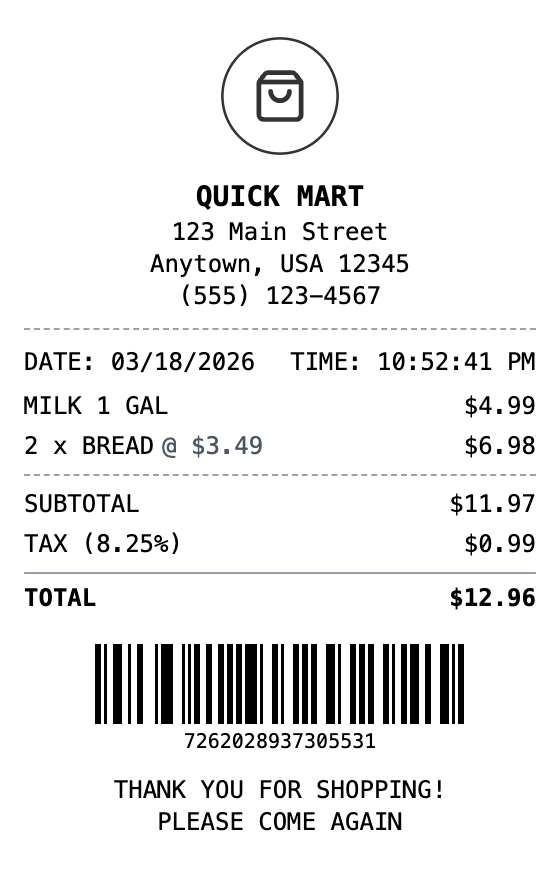
A typical convenience store receipt includes the store name and address, date and time, itemized products with prices, subtotal, sales tax, total, payment method, and a transaction number or barcode.
Can I customize the items on the receipt?
Yes, you can add, remove, and edit every item on the receipt including descriptions, quantities, and prices. The subtotal and total are calculated automatically.
What paper style looks most realistic?
The thermal paper style with the receipt font most closely resembles real register receipts. You can also apply aging or worn effects for additional realism.
What is a convenience store receipt?
A convenience store receipt is a printed record of a retail transaction at a corner store, bodega, or mini-mart. It typically lists each item purchased along with its price, the subtotal, applicable sales tax, and the total amount paid. Most convenience store receipts also include the store name, address, date and time of purchase, and a transaction or barcode number for returns or reference.
Why would you recreate a convenience store receipt?
Convenience store receipts are essential for tracking everyday spending, filing expense reports, and maintaining proof of purchase for returns or warranty claims. Small business owners who operate convenience stores also need receipt templates for their POS systems or to replace malfunctioning receipt printers. Having a digital copy is useful for bookkeeping and tax documentation.
Which fields matter most on a convenience store receipt?
Store name, address, and phone number • Date and time of transaction • Itemized list with quantities and individual prices • Subtotal, sales tax rate, and total amount • Payment method (cash or card with last four digits) • Transaction number or barcode for reference
How to make your convenience store receipt look right
Use the thermal paper style for an authentic register receipt look • Include a barcode at the bottom for a realistic transaction reference • Add your actual store address and phone number for legitimate business use • Double-check that tax rates match your local jurisdiction
Is MakeMyReceipt free to use?
Yes. You can build and customize receipts for free with no sign-up required. Watermark-free exports and saved receipts are available with Pro.
What file formats can I export?
You can export your receipts as PNG (high-quality images), PDF (print-ready documents), or JPEG (compressed images for smaller file sizes).
You Might Also Need

Grocery Receipt
Supermarket grocery shopping receipt

Walmart Receipt
Big-box retail receipt with detailed transaction info, EFT payment details, and dual barcodes. Upload your own logo to customize.

Target Receipt
Modern department store receipt with category headers, multiple tax rates, and loyalty program section. Upload your own logo to customize.
Cash Receipt
Simple cash payment receipt

Family Dollar Receipt
Dollar store receipt with everyday essentials