
Cash Receipt Generator
Generate simple cash payment receipts with amount, date, and payer info. Perfect for any cash transaction or payment confirmation.
Start Your Cash Receipt
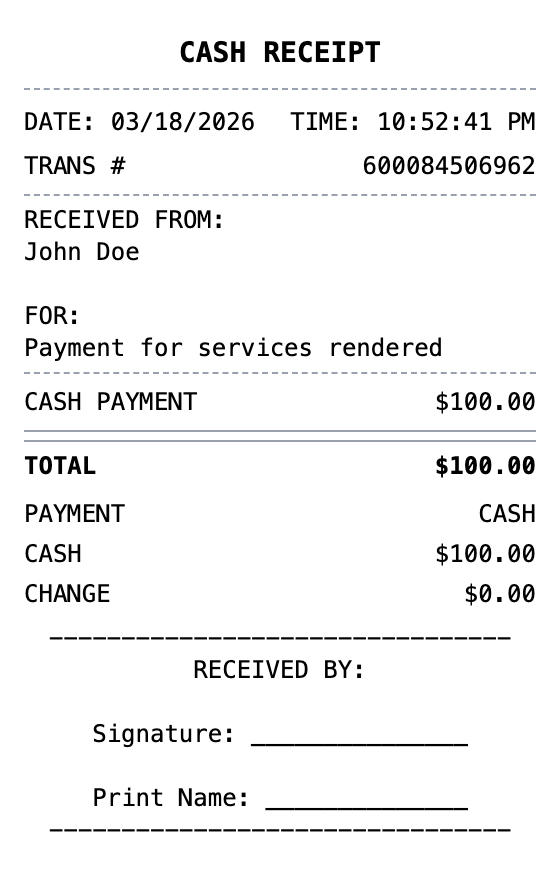
Built to Get the Details Right
Fonts, spacing, and layout are modeled on the real thing, so your export holds up.
Drag & Drop Builder
Structure payment amount, payer info, and purpose in a simple, clear cash receipt format.
Real-time Preview
See your cash receipt update as you add payment details, dates, and transaction info.
Multiple Export Formats
Download as PDF for bookkeeping, PNG for quick records, or JPEG for payment confirmation.
Custom Styling
Include receiver name, payment purpose, and format it for proper cash transaction records.
Barcode & QR Support
Add transaction barcodes or QR codes for payment tracking and record keeping.
Paper Styles
Choose white paper for professional records or thermal for quick cash register receipts.
How to Generate Your Cash Receipt
Three simple steps to generate professional receipts
Step 1:
Open the template
Step 2:
Edit every field
Step 3:
Download your file
When You Might Need One
From bookkeeping to mockups, it covers a lot of ground
Cash Payments
Document any cash transaction with a proper written receipt
Rent Payments
Provide cash payment receipts for rent paid without bank transfers
Service Payments
Receipt for cash payments to contractors, babysitters, or tutors
Small Business Sales
Record cash register sales for businesses without electronic POS
Bookkeeping Records
Maintain cash income records for tax filing and accounting
Personal Loans
Document cash loan repayments between individuals
Questions People Ask
Quick answers about this template
Why do I need a cash receipt?
Cash transactions leave no automatic paper trail like credit card payments do. A cash receipt protects both parties by documenting that payment was made, the amount, and the purpose. It is also needed for bookkeeping and tax records.
Is a cash receipt legally binding?
A cash receipt is a record of payment, not a contract. However, signed cash receipts serve as strong evidence in disputes about whether payment was made. For important transactions, both parties should sign.
What should I include on a cash receipt?
Include the date, names of both parties, amount paid, purpose of payment, and signatures. For business transactions, also include a receipt number and business details.
What exactly is a cash receipt?
A cash receipt is a written acknowledgment that a cash payment has been received. Unlike credit card receipts that are automatically generated by payment processors, cash transactions require manual documentation. A proper cash receipt includes the date, payer and payee names, amount paid, purpose of payment, and signatures from both parties. Cash receipts are commonly used in person-to-person transactions, small businesses without POS systems, and informal service payments.
When would you need a cash receipt?
Cash receipts are critical for creating a paper trail for cash transactions that would otherwise go undocumented. They protect both the payer (proof of payment) and the receiver (proof of income received). Small businesses need them for bookkeeping and tax compliance, landlords use them for cash rent payments, and individuals need them for private sales, service payments, and personal loans. Without a cash receipt, disputes about whether payment was made become difficult to resolve.
What information goes on a cash receipt?
Date of payment • Payer name (who paid) and payee name (who received) • Amount paid in numbers and optionally written out • Purpose or reason for payment • Payment method confirmation (cash) • Signature lines for both parties
How to make your cash receipt look right
Always include signature lines for both payer and receiver for legal validity • Clearly state the purpose of the payment to avoid future disputes • Set tax to 0% for simple cash transactions unless tax applies to the goods or services • Add a custom message noting the receipt should be retained by both parties
Is MakeMyReceipt free to use?
Yes. You can build and customize receipts for free with no sign-up required. Watermark-free exports and saved receipts are available with Pro.
What file formats can I export?
You can export your receipts as PNG (high-quality images), PDF (print-ready documents), or JPEG (compressed images for smaller file sizes).
You Might Also Need
Sales Receipt
General sales transaction receipt
Expense Receipt
Business expense receipt for reimbursement

Cash App Receipt
Mobile payment receipt with $cashtag, transaction status, and instant transfer details.

Venmo Receipt
Social payment receipt with @usernames, payment notes, and transaction details.
PayPal Receipt
Digital payment receipt with transaction ID, sender/receiver info, and payment confirmation details.