
PayPal Receipt Generator
Use our PayPal receipt generator to create realistic looking PayPal receipts complete with transaction ID, sender and recipient, fees, and funding source. Download it as a PNG, JPG, or PDF in about a minute! Perfect for design mockups and personal record keeping.
Start Your PayPal Receipt
Make a PayPal Receipt That Looks the Part
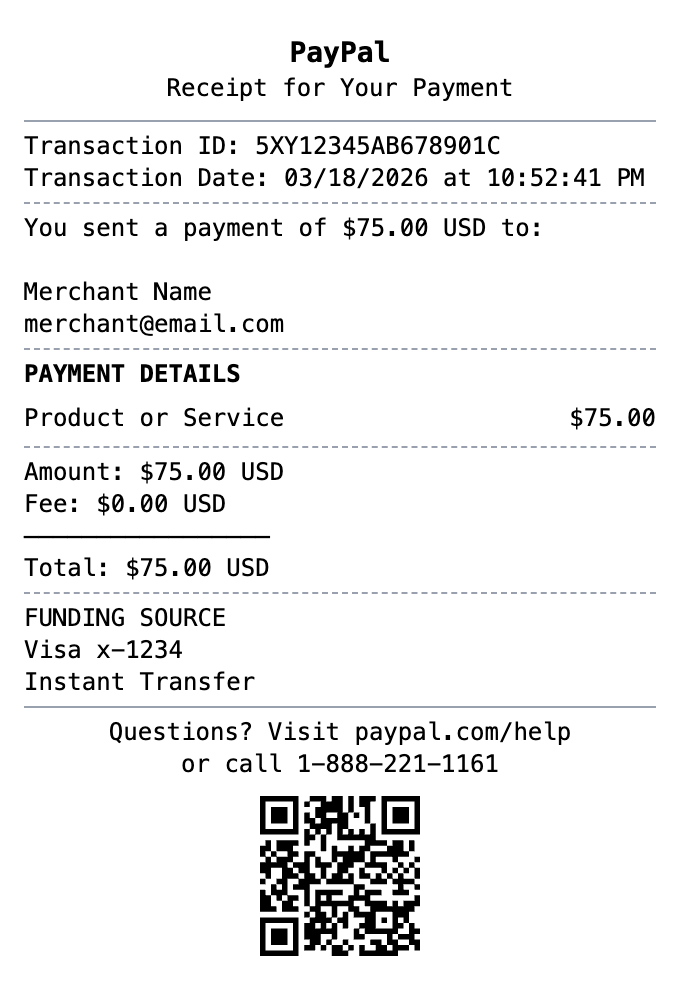
Every detail is editable, from the header at the top down to the barcode.
Transaction Details
Include unique transaction IDs, dates, and complete payment information.
Sender/Receiver Info
Show sender and recipient details with email addresses and names.
Fee Breakdown
Display payment amounts, fees, and total charges clearly.
Funding Source
Show the payment method used - bank account, card, or PayPal balance.
Professional Format
Clean, recognizable PayPal receipt layout for documentation.
Digital Export
Download as a PNG, JPG, or PDF. The PNG works anywhere you'd use a screenshot.
How to Generate Your PayPal Receipt
Three simple steps to generate professional receipts
Step 1:
Open the template
Step 2:
Edit every field
Step 3:
Download your file
What a Real PayPal Receipt Includes
Get these fields right and your paypal receipt will read like the original.
- Header
- The PayPal branding and a short confirmation line such as "You sent a payment" or "Receipt for your payment."
- Transaction ID
- A unique 17-character alphanumeric code that identifies the payment. It is the key reference for support, disputes, and your own records.
- Amount and date
- The payment amount and currency, along with the date and time the transaction was completed.
- Sender and recipient
- The names and email addresses on both sides of the payment, since PayPal accounts are tied to email.
- Funding source
- Where the money came from: a linked bank account, a debit or credit card, or the PayPal balance.
- Description and fees
- What the payment was for, plus any transaction fee (charged to the seller on goods-and-services payments) and the final total.
When You Might Need One
From bookkeeping to mockups, it covers a lot of ground
Proof of Payment
Document an online payment as proof for a purchase or transfer
Freelance Invoicing
Provide clients with a clear record of a completed PayPal payment
Expense Records
Keep organized records of PayPal spending for budgeting
Refund & Dispute Records
Retain payment details in case you need to request a refund or file a dispute
Bookkeeping
Reconcile PayPal payments against your accounts for tax and accounting
Design Mockups
Create realistic digital payment receipt mockups for design projects
Questions People Ask
Quick answers about this template
What is a PayPal transaction ID?
It's the unique 17-character code PayPal assigns to every payment, like 5XY12345AB678901C. Support, refunds, and disputes all use it to look the payment up, which makes it the most important field on the receipt.
What details are on a PayPal receipt?
The transaction ID, date, amount, sender and recipient with their emails, the funding source, a short description of the payment, any fee, and the total. You can edit every one of these in the builder.
Can I download it as a PDF or a screenshot?
Both. Export as a PDF for records and invoices, or as a PNG that looks right anywhere you'd normally paste a screenshot.
Can I use a PayPal receipt as proof of payment?
Yes. PayPal receipts are standard proof of payment for purchases, freelance work, and expense records. Use the template to recreate a record of a real payment or to build a mockup, not to misrepresent a payment that never happened.
What does a paypal receipt show?
A PayPal receipt is the confirmation you get after sending or receiving money through PayPal. There's no paper version. It arrives by email and sits in your account activity, and it shows the transaction ID, the date, the amount, who paid whom, the funding source, and any fee PayPal took.
When would you need a paypal receipt?
People pull up PayPal receipts to back up a refund request, settle a dispute, show a client an invoice was paid, or hand records to an accountant at tax time. Every payment traces back to its transaction ID, so the receipt is the quickest way to point at one specific payment when something needs sorting out.
Which fields matter most on a paypal receipt?
PayPal transaction ID (a 17-character code) • Date and time of the payment • Payment amount and currency • Sender name and email • Recipient or merchant name and email • Funding source (bank, card, or PayPal balance) • Item or invoice description • Any fees and the final total
Tips for creating your paypal receipt
Use a realistic transaction ID: 17 characters, letters and numbers mixed, like 5XY12345AB678901C • Friends and family payments usually have no fee line. Goods and services payments do, since PayPal charges the seller, so add one if that's what you're recreating • The sender's copy and the recipient's copy of a real receipt aren't identical, so decide whose view you're building • Write amounts the way PayPal does, with the currency after the number, like $75.00 USD
Is MakeMyReceipt free to use?
Yes. You can build and customize receipts for free with no sign-up required. Watermark-free exports and saved receipts are available with Pro.
What file formats can I export?
You can export your receipts as PNG (high-quality images), PDF (print-ready documents), or JPEG (compressed images for smaller file sizes).
You Might Also Need

Venmo Receipt
Social payment receipt with @usernames, payment notes, and transaction details.

Cash App Receipt
Mobile payment receipt with $cashtag, transaction status, and instant transfer details.

Zelle Receipt
Bank transfer receipt with confirmation number, recipient details, and instant transfer status.
Money Transfer Receipt
Wire transfer or money transfer receipt
Cash Receipt
Simple cash payment receipt