
Venmo Receipt Generator
Build Venmo-style social payment receipts featuring @usernames, payment notes, and transaction details. Perfect for P2P payment mockups and documentation.
Make Your Venmo Receipt
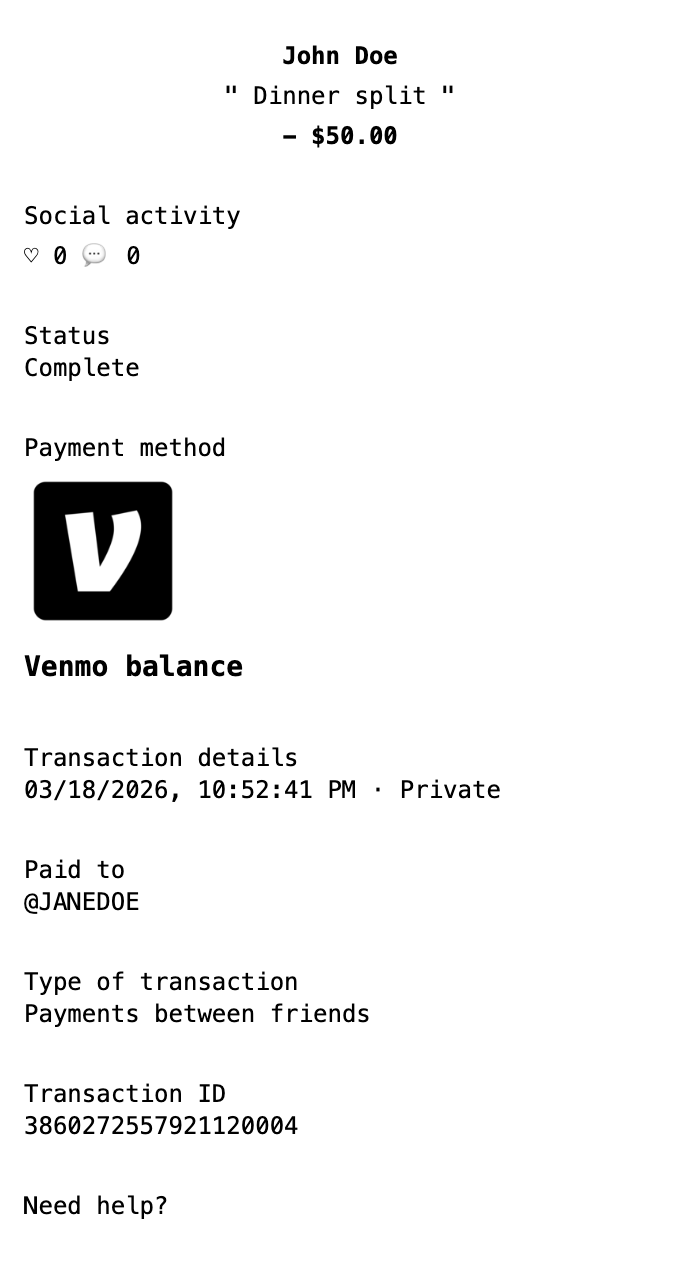
Make a Venmo Receipt That Looks the Part
Every detail is editable, from the header at the top down to the barcode.
@Username Support
Include Venmo @usernames for both sender and recipient.
Social Payment Notes
Add the casual payment descriptions Venmo is known for with emoji support.
Social Activity
Show likes and comments count like the real Venmo app.
Privacy Indicator
Display private or public transaction status.
Transaction ID
Include unique payment identifiers for transaction records.
Authentic Format
Matches the exact layout of Venmo app payment details.
Create a Venmo Receipt in Three Steps
No account needed to start building
Step 1:
Choose your template
Step 2:
Customize your receipt
Step 3:
Download and use
Anatomy of a Venmo Receipt
Every field you'll find on the real thing, and why it's there.
- Usernames
- The sender and recipient @handles. Venmo is username-based, and payments are addressed to a handle rather than a phone number or account.
- Amount
- The payment amount. On personal transfers there is no fee; goods-and-services payments deduct a seller fee.
- Note
- The message attached to the payment, famous for its emoji. On business payments this usually describes the item or service.
- Date and payment ID
- When the payment happened plus the long numeric ID Venmo assigns. The ID is what support references in a dispute.
- Funding source
- Whether the money came from the Venmo balance, a linked bank account, or a card.
- Privacy setting
- Venmo transactions carry a visibility setting: public, friends only, or private. The amount is never public, but the note and participants can be.
What You Can Do
Create receipts for any purpose
Splitting Expenses
Document shared rent, meals, and trip costs between friends
Freelance Payments
Keep records of client payments received through Venmo
Proof of Payment
Show that a payment was sent, received, and completed
Tax Records
Separate goods-and-services income from personal transfers
Dispute Records
Reference payment IDs when resolving issues with Venmo support
Design Mockups
Create realistic payment app mockups for design projects
Frequently Asked Questions
Common questions about creating venmo receipts
What does a Venmo receipt show?
A Venmo transaction record shows the amount, date, both usernames, the payment note, the funding source, and a payment ID. Our template lets you customize each of these fields.
Does Venmo provide receipts?
Every payment has a transaction detail screen in the app and an email confirmation. Business profiles can also send purchase receipts. Many people recreate a clean copy when they need a printable or shareable version.
Are Venmo payments reported for taxes?
Personal reimbursements between friends are not taxable income. Payments for goods and services may be reported on a 1099-K once federal thresholds are met, which is why keeping clear notes on business payments matters.
What is a venmo receipt?
A Venmo receipt is the transaction detail screen or email confirmation for a payment sent or received on Venmo. It shows the amount, the date, both usernames, the note attached to the payment (with Venmo's trademark emoji), the funding source, and a payment ID Venmo uses to reference the transfer.
When would you need a venmo receipt?
Venmo records matter for splitting shared expenses, documenting payments to freelancers and small sellers, tax reporting when payments are for goods and services, and disputes. Because personal Venmo balances mix social and financial life, a clean per-payment record is often the easiest way to prove who paid what and when.
Which fields matter most on a venmo receipt?
Amount sent or received • Date and time of the payment • Sender and recipient usernames (@handles) • Payment note, often with emoji • Funding source (Venmo balance, bank, or card) • Payment ID • Privacy setting (public, friends, or private)
Getting the details right on your venmo receipt
Use @username handles for both parties, since that is how Venmo addresses payments • Include a casual note, because nearly every real Venmo payment has one • Show the funding source for a complete record • For goods-and-services payments, note that the seller pays a small fee
Is MakeMyReceipt free to use?
Yes. You can build and customize receipts for free with no sign-up required. Watermark-free exports and saved receipts are available with Pro.
What file formats can I export?
You can export your receipts as PNG (high-quality images), PDF (print-ready documents), or JPEG (compressed images for smaller file sizes).
More Templates Like This One

Cash App Receipt
Mobile payment receipt with $cashtag, transaction status, and instant transfer details.

Zelle Receipt
Bank transfer receipt with confirmation number, recipient details, and instant transfer status.
PayPal Receipt
Digital payment receipt with transaction ID, sender/receiver info, and payment confirmation details.
Money Transfer Receipt
Wire transfer or money transfer receipt
Cash Receipt
Simple cash payment receipt