
Zelle Receipt Generator
Generate Zelle-style bank transfer receipts with confirmation numbers, recipient details, and transfer status. Great for payment documentation.
Create Your Zelle Receipt
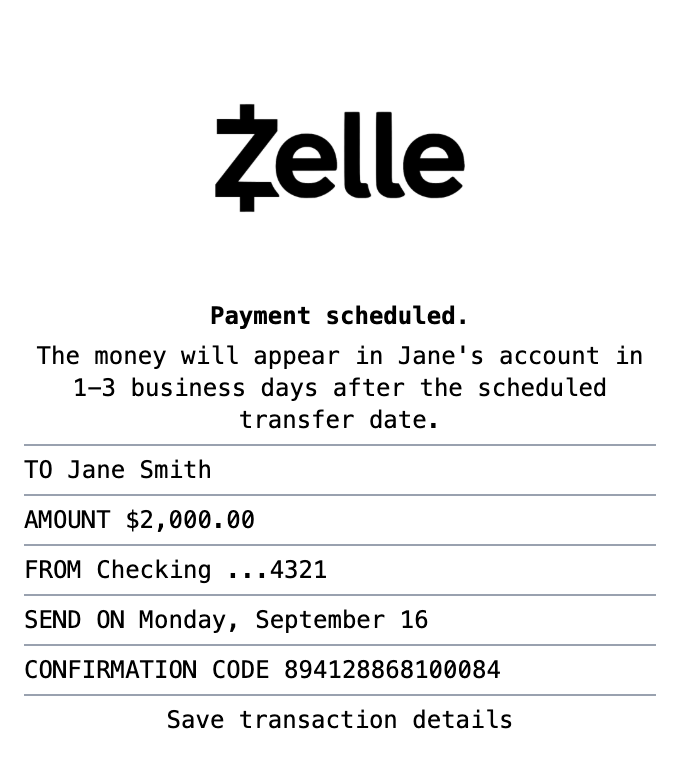
Everything You Need in a Zelle Receipt
Pick a template, make it your own, and download a zelle receipt that looks the part. No design skills needed.
Confirmation Codes
Include unique Zelle confirmation codes for transaction tracking.
Bank Account Details
Show sending account information with masked account numbers.
Recipient Information
Display recipient name clearly at the top of the receipt.
Scheduled Payments
Show scheduled payment dates and transfer timing.
Clean Mobile Format
Matches the exact layout of Zelle app payment confirmations.
Professional Format
Clean layout matching official Zelle payment confirmations.
How to Make a Zelle Receipt
The whole process takes about a minute
Step 1:
Start from this template
Step 2:
Make it yours
Step 3:
Save and download
What's on a Real Zelle Receipt
The parts that make up an authentic zelle receipt, and what each one means.
- Confirmation number
- The unique code your bank assigns to the transfer. It is the reference you give the bank if a payment needs to be traced.
- Amount and status
- The dollar amount along with the transfer status: completed, pending, or scheduled.
- Recipient details
- The recipient name plus the email address or U.S. mobile number they enrolled with Zelle. Transfers are addressed to that identifier, not to an account number.
- Date and time
- When the transfer was sent. Most Zelle payments between enrolled users complete within minutes.
- Memo
- The optional note the sender attached, such as "June rent" or "Dinner." It is how both sides remember what the payment was for.
- Bank branding
- Zelle confirmations come through your own banking app or email, so the receipt usually carries the bank's name alongside the Zelle mark.
Where a Zelle Receipt Comes in Handy
Real situations where this template gets used
Rent Payments
Document rent paid by Zelle with a clear, shareable record
Client Payments
Give clients a clean confirmation when they pay invoices by Zelle
Proof of Payment
Keep a record of transfers for disputes or bank tracing
Bookkeeping
Reconcile Zelle payments against your accounts
Personal Records
Track money sent to family and friends
Design Mockups
Create realistic payment confirmation mockups for design projects
Common Questions, Answered
The details people usually ask about
What does a Zelle receipt show?
A Zelle confirmation shows the confirmation number, the amount, the date and time, the recipient name and their enrolled email or phone number, and any memo attached to the payment. Our template lets you customize each of these fields.
Does Zelle send receipts?
Zelle itself does not mail paper receipts. The record lives in your banking app and in the confirmation email or text your bank sends, which is why many people recreate a clean copy for their records.
Can I use a Zelle receipt as proof of payment?
Yes. Zelle confirmations are commonly used as proof of rent, service, and personal payments. Use the template to document a real transfer or build a mockup, not to misrepresent a payment that did not happen.
What exactly is a zelle receipt?
A Zelle receipt is the confirmation screen or email you get after sending or receiving money through Zelle, the bank-to-bank transfer network built into most major banking apps. It shows the confirmation number, the amount, the date, who the money went to or came from, and often a memo describing what the payment was for.
Why would you recreate a zelle receipt?
Because Zelle payments are instant and cannot be reversed, the confirmation is often the only record that a transfer happened. People keep Zelle receipts as proof of payment for rent, services, and personal transfers, for bookkeeping when clients pay by Zelle, and as a reference if a payment needs to be traced with the bank.
What information goes on a zelle receipt?
Confirmation or transaction number • Amount sent or received • Date and time of the transfer • Recipient name and their enrolled email or phone number • Sender name • Memo or note describing the payment • Status (completed, pending, or scheduled)
Tips for creating your zelle receipt
Use a realistic confirmation number format rather than a short round number • Include the enrolled email or phone number, since Zelle identifies people that way • Add a memo line, because most real Zelle payments include one • Match the amount and date to your bank statement if documenting a real transfer
Is MakeMyReceipt free to use?
Yes. You can build and customize receipts for free with no sign-up required. Watermark-free exports and saved receipts are available with Pro.
What file formats can I export?
You can export your receipts as PNG (high-quality images), PDF (print-ready documents), or JPEG (compressed images for smaller file sizes).
Similar Receipt Templates

Venmo Receipt
Social payment receipt with @usernames, payment notes, and transaction details.

Cash App Receipt
Mobile payment receipt with $cashtag, transaction status, and instant transfer details.
PayPal Receipt
Digital payment receipt with transaction ID, sender/receiver info, and payment confirmation details.
Money Transfer Receipt
Wire transfer or money transfer receipt
Cash Receipt
Simple cash payment receipt