
Walmart Receipt Generator
Create Walmart-style retail receipts with itemized purchases, EFT payment details, tax breakdowns, and barcodes. Perfect for retail mockups and expense reports.
Create Your Walmart Receipt
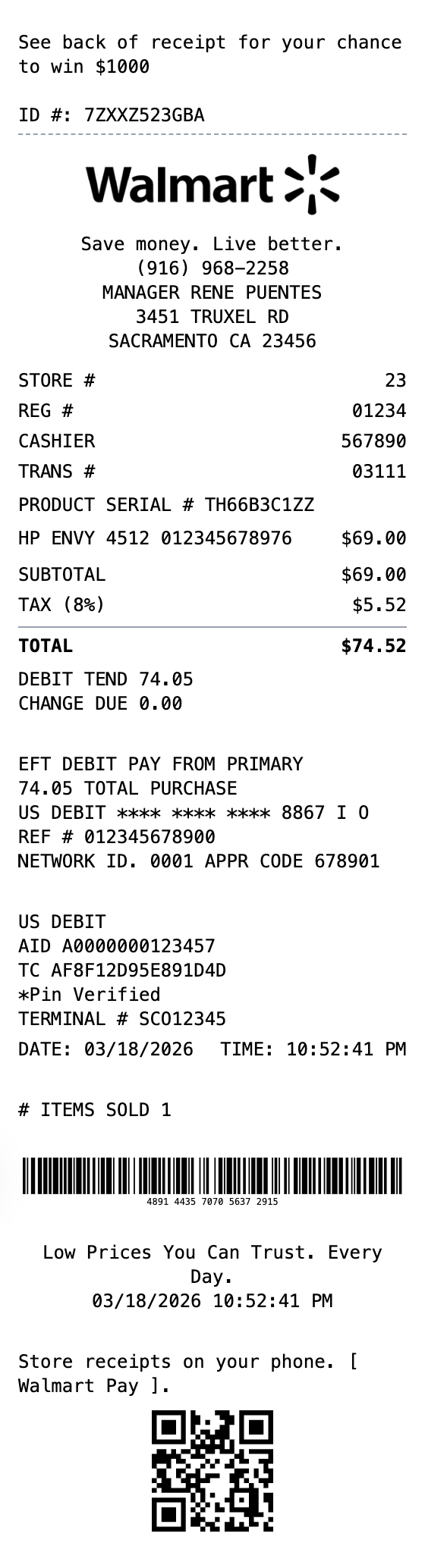
Built to Get the Details Right
Every detail is editable, from the header at the top down to the barcode.
Drag & Drop Builder
Rearrange receipt sections to match the exact layout of major retail receipts - header, items, totals, payment details.
Real-time Preview
See your big-box receipt come together instantly as you customize business info, items, and payment details.
Multiple Export Formats
Download as PNG for digital records, PDF for printing, or JPEG for smaller file sizes.
Custom Styling
Upload your logo, add your tagline, and customize every detail while keeping the professional retail receipt format.
Barcode & QR Support
Include transaction barcodes and QR codes just like major retailers - link to your website or loyalty program.
Paper Styles
Choose thermal paper for authentic register receipt look or white paper for a cleaner appearance.
How to Make a Walmart Receipt
The whole process takes about a minute
Step 1:
Start from this template
Step 2:
Make it yours
Step 3:
Save and download
What's on a Real Walmart Receipt
The parts that make up an authentic walmart receipt, and what each one means.
- Store header
- The Walmart name and "Save money. Live better." tagline, followed by the store manager, street address, phone number, and store number.
- Transaction line
- Short codes for the store (ST#), operator or cashier (OP#), terminal (TE#), and transaction (TR#) that identify exactly where and when the purchase happened.
- Item lines
- Each product on its own line with an abbreviated name, a 12-digit UPC, the price, and a single letter marking its tax status.
- Totals block
- Subtotal, the sales tax with its rate, and the final total paid.
- Payment details
- The tender type (debit, credit, or cash), the card network and last four digits, and an approval code for card payments.
- Transaction code (TC#)
- A long numeric code near the bottom, paired with a barcode, that Walmart scans to pull up the purchase for a return or price check.
Where a Walmart Receipt Comes in Handy
Real situations where this template gets used
Replace a Lost Receipt
Recreate a receipt for your own Walmart purchase when the original was lost or faded
Expense Tracking
Document retail purchases for business expense reports and reimbursement
Returns Records
Keep an organized copy of purchases in case you need to return or exchange an item
Budget Tracking
Itemize spending to keep a clear picture of your household budget
Design Mockups
Create realistic retail receipt mockups for app, film, or website projects
Tax Records
Maintain itemized purchase records for deductions and filing
Common Questions, Answered
The details people usually ask about
What information is on a Walmart receipt?
A Walmart receipt shows the store name, address, and number, the date and time, each item with its UPC and price, a tax-code letter per item, the subtotal, sales tax, and total, the payment method and card last four, and a long transaction (TC) number with a barcode. Our template lets you customize all of these fields.
What do the letters next to the prices mean?
The single letter after each price is a tax code. It marks whether an item was taxable or not, which is why the letters should be consistent with the sales tax shown in the totals. Exact codes can vary by state and store.
Can I recreate a Walmart receipt I lost?
Yes. You can use the template to recreate a receipt for your own records if the original was lost, or to build a realistic mockup for design or training. It should not be used to misrepresent a purchase that did not happen.
What is a walmart receipt?
A Walmart receipt is the itemized proof of purchase you get at the register, or by email for online orders, after shopping at Walmart. It lists every item with its price and a tax code, the store location and number, the register and cashier IDs, the payment method, and a long transaction (TC) number with a barcode that Walmart uses for returns and price lookups.
When would you need a walmart receipt?
People keep Walmart receipts for returns and exchanges, expense tracking and reimbursement, warranty claims, and price adjustments. Because Walmart ties a return to the transaction printed on the receipt, holding on to a legible copy makes returning or exchanging an item far easier, and the itemized detail is handy for budgeting and business expense records.
What information goes on a walmart receipt?
Store name, address, phone, and store number (ST#) • Date, time, register (OP#/TE#), and cashier • Each item with its description, UPC, price, and a tax-code letter • Subtotal, sales tax, and total • Payment method and card last four digits • Transaction (TC) number and barcode used for returns • Items-sold count and the survey invitation line
Tips for creating your walmart receipt
Match the tax-code letter next to each price (for example N for non-taxable, X or T for taxable) to your tax total so the numbers line up • Keep the TC number long, usually around 20 digits, for an authentic look • The "chance to win $1000" survey line near the top is part of the real Walmart format • Use realistic register and cashier numbers rather than round placeholders
Is MakeMyReceipt free to use?
Yes. You can build and customize receipts for free with no sign-up required. Watermark-free exports and saved receipts are available with Pro.
What file formats can I export?
You can export your receipts as PNG (high-quality images), PDF (print-ready documents), or JPEG (compressed images for smaller file sizes).
Similar Receipt Templates

Target Receipt
Modern department store receipt with category headers, multiple tax rates, and loyalty program section. Upload your own logo to customize.

Costco Receipt
Warehouse club receipt with member ID and bulk items

Grocery Receipt
Supermarket grocery shopping receipt

Family Dollar Receipt
Dollar store receipt with everyday essentials

Convenience Store Receipt
Standard retail receipt with items, tax, and payment