
Home Depot Receipt Generator
Build Home Depot-style receipts with SKU numbers, department codes, itemized materials, and payment details. Perfect for hardware store mockups and contractor projects.
Generate Your Home Depot Receipt
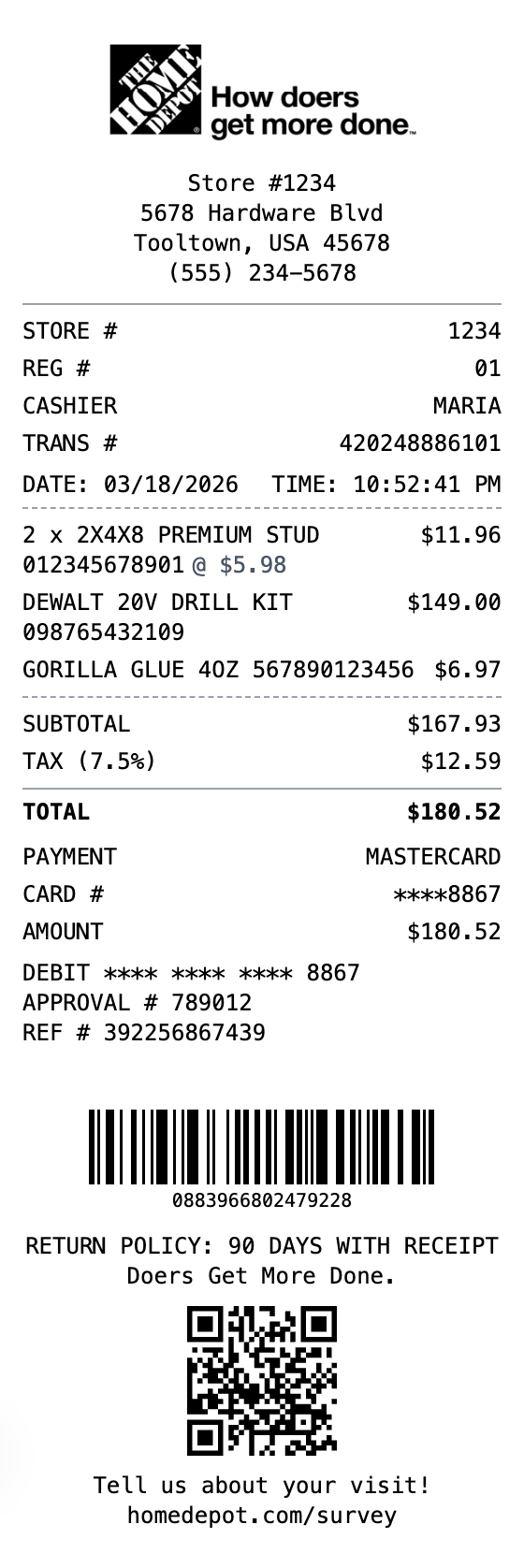
The Quick Way to Build a Home Depot Receipt
Every detail is editable, from the header at the top down to the barcode.
SKU Numbers
Include product SKUs and department codes just like authentic Home Depot receipts.
Store Information
Add store numbers, addresses, and manager names for complete documentation.
Contractor Friendly
Format designed for expense tracking with detailed item descriptions and quantities.
Multiple Payment Types
Support for credit, debit, and Pro Xtra account payment displays.
Return Policy Display
Include return policy information and survey links.
Dual Barcode Support
Add both Code128 transaction barcodes and QR codes for surveys.
Making Your Home Depot Receipt, Step by Step
Pick, edit, download. That's the entire workflow.
Step 1:
Pick your template
Step 2:
Fill in the details
Step 3:
Export your receipt
The Parts of a Home Depot Receipt, Explained
Worth knowing before you build your own version.
- Store header
- The Home Depot name and "More saving. More doing." tagline, with the store number, address, and phone number.
- Register line
- The cashier name or ID, register number, and a transaction ID identifying the specific sale.
- Item lines
- Each product with its department and SKU number, a description, and the price. Quantities and per-unit pricing appear for bulk items.
- Totals block
- Subtotal, the sales tax, and the total paid.
- Payment details
- The card type and last four digits or cash tendered, plus an authorization code for card payments.
- Return policy and barcode
- A short return-policy notice and a barcode at the bottom that the store scans to look up the purchase for a return, even without the original card.
Common Uses for a Home Depot Receipt
A few of the ways people put this template to work
Contractor Billing
Document materials purchased for a job to bill clients accurately
Project Cost Tracking
Track spending on supplies and materials across a project
Returns & Exchanges
Keep a copy of purchases in case items need to be returned or exchanged
Warranty & Rebates
Retain proof of purchase for warranty claims and manufacturer rebates
Expense Reports
Document hardware and supply purchases for reimbursement
Design Mockups
Create realistic hardware-store receipt mockups for design or training
Home Depot Receipt FAQs
Everything else you might want to know
What is the barcode at the bottom of a Home Depot receipt for?
That barcode encodes the transaction so the store can scan it to pull up your purchase at the returns desk, often without needing the original payment card. It is one of the most important elements on the receipt.
What details does a Home Depot receipt include?
It shows the store name, number, and address, the date and time, the register and cashier, each item with its SKU and price, the subtotal, sales tax, and total, the payment method, a return-policy notice, and a return barcode. Our template lets you customize all of these.
Can contractors use this to bill clients?
Yes. Itemized Home Depot receipts are commonly used to document materials and track project costs, which makes them useful for billing clients and keeping accurate job records.
What does a home depot receipt show?
A Home Depot receipt is the printed proof of purchase from The Home Depot. It lists each item with its SKU and price, the store number and address, the cashier and register, the sales tax and total, the payment details, and a barcode at the bottom that the store scans to look up the purchase for returns.
Why would you recreate a home depot receipt?
Home Depot receipts matter most for returns and exchanges, since the store can pull up a purchase from the receipt barcode or the card used to pay. They are also used for expense tracking, warranty and rebate claims, and documenting materials for a job. Contractors in particular rely on itemized Home Depot receipts to bill clients and track project costs.
What information goes on a home depot receipt?
Store name, address, phone, and store number • Date, time, register, cashier, and transaction ID • Each item with its SKU number, description, and price • Subtotal, sales tax, and total • Payment method and card last four digits • Return-policy notice • Return barcode at the bottom of the receipt
Tips for creating your home depot receipt
Include the long SKU numbers next to each item, since they are a signature part of a Home Depot receipt • Keep the return-policy text near the bottom for an authentic look • Add the return barcode, which is the element the store scans to find the purchase • Use a realistic register and cashier line rather than round placeholders
Is MakeMyReceipt free to use?
Yes. You can build and customize receipts for free with no sign-up required. Watermark-free exports and saved receipts are available with Pro.
What file formats can I export?
You can export your receipts as PNG (high-quality images), PDF (print-ready documents), or JPEG (compressed images for smaller file sizes).
Related Receipt Templates

Lowes Receipt
Home improvement store receipt with sale header, invoice totals, and detailed payment info. Upload your own logo to customize.

Hardware Store Receipt
Hardware store receipt with SKU and return policy

Walmart Receipt
Big-box retail receipt with detailed transaction info, EFT payment details, and dual barcodes. Upload your own logo to customize.
Sales Receipt
General sales transaction receipt
Itemized Receipt
Detailed itemized receipt with line items