
Restaurant Receipt Generator
Generate professional restaurant receipts with menu items, tax, tip line, and server info. Perfect for restaurants, cafes, and food service mockups.
Make Your Restaurant Receipt
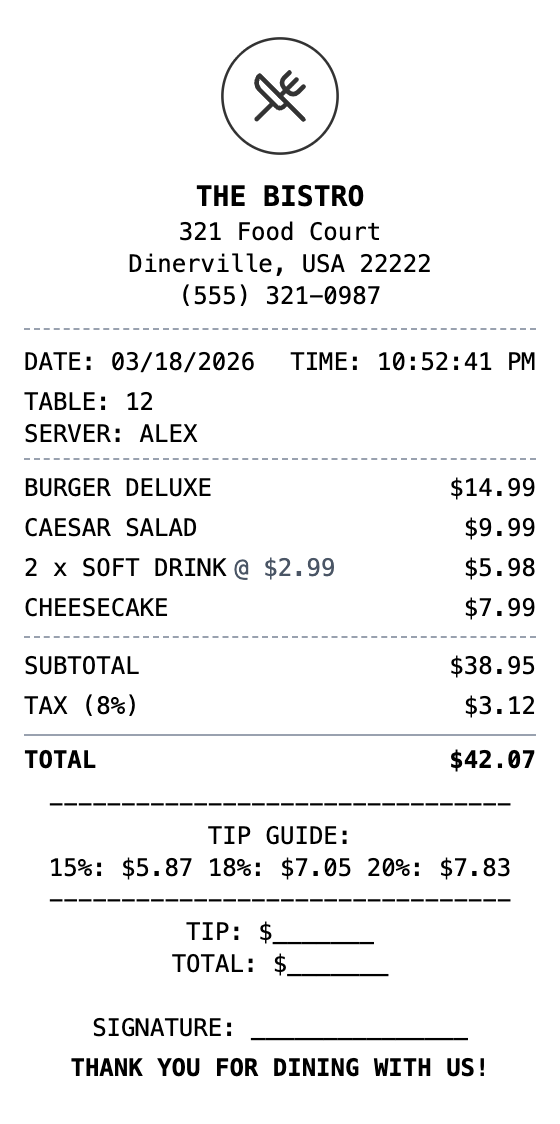
Zero to Restaurant Receipt in 60 Seconds
Pick a template, make it your own, and download a restaurant receipt that looks the part. No design skills needed.
Drag & Drop Builder
Arrange menu items, drinks, appetizers, and desserts in the order your restaurant presents the check.
Real-time Preview
Watch your dining receipt update as you add dishes, modify prices, and include server information.
Multiple Export Formats
Download as PDF for expense reports, PNG for social sharing, or JPEG for quick records.
Custom Styling
Include your restaurant name, table number, server name, and format it like your actual guest checks.
Barcode & QR Support
Add barcodes for order tracking or QR codes linking to your menu, reviews, or reservation system.
Paper Styles
Choose thermal paper for authentic restaurant receipts or white for a cleaner presentation.
Create a Restaurant Receipt in Three Steps
No account needed to start building
Step 1:
Choose your template
Step 2:
Customize your receipt
Step 3:
Download and use
What You Can Do
Create receipts for any purpose
Business Meal Expenses
Document client dinners and team meals for company reimbursement
Tax Deductions
Record business entertainment meals for IRS Schedule C deductions
Restaurant Operations
Generate guest checks when your POS system is down
Personal Budgeting
Track dining expenses as part of monthly food spending
Menu Design Mockups
Create receipt mockups for restaurant app or website designs
Catering Records
Document catering orders and event dining expenses
Frequently Asked Questions
Common questions about creating restaurant receipts
Can I add a tip line to the restaurant receipt?
Yes, use the custom message section to add a tip guide with suggested percentages, a tip blank line, and a signature line just like real restaurant checks.
How do I itemize food and drinks separately?
You can add all items to the items list section with descriptive names. For visual separation, insert a divider section between food and beverage items.
Can I include server and table information?
Yes, use the transaction info section to add server name, table number, and order number, or include them in a custom message section.
What exactly is a restaurant receipt?
A restaurant receipt is a detailed record of a dining transaction, listing each food and beverage item ordered along with prices, subtotals, taxes, tips, and the total amount charged. Restaurant receipts typically include the establishment name, table number, server name, and a breakdown of appetizers, entrees, drinks, and desserts. They may also include a tip line and suggested gratuity percentages.
When would you need a restaurant receipt?
Restaurant receipts are commonly needed for business meal expense reports, tax deductions for business entertainment, and personal budgeting. Companies require itemized dining receipts to reimburse employees, and self-employed individuals need them to document deductible business meals. They are also useful for resolving billing disputes or tracking dietary spending.
Which fields matter most on a restaurant receipt?
Restaurant name, address, and phone number • Server name and table number • Itemized food and beverage list with individual prices • Subtotal, tax, tip line, and grand total • Date and time of the meal • Payment method and transaction reference • Tip suggestions (15%, 18%, 20%)
Getting the details right on your restaurant receipt
Add a custom message section with tip guide percentages for realism • Include server name and table number in the transaction info section • Group items logically: appetizers, entrees, beverages, desserts • Use the signature line in a custom message for credit card receipts
Is MakeMyReceipt free to use?
Yes. You can build and customize receipts for free with no sign-up required. Watermark-free exports and saved receipts are available with Pro.
What file formats can I export?
You can export your receipts as PNG (high-quality images), PDF (print-ready documents), or JPEG (compressed images for smaller file sizes).
More Templates Like This One

Fast Food Receipt
Quick service restaurant receipt

Cafe Receipt
Coffee shop or cafe receipt
McDonald's Receipt
Fast food receipt with order number and survey code
DoorDash Receipt
Food delivery receipt with order details, driver tip, delivery fee, and itemized menu items.

Starbucks Receipt
Coffee shop receipt with drinks, modifiers, and barista info