
Service Receipt Generator
Create professional service receipts with hourly rates, descriptions, and totals. Perfect for contractors, consultants, freelancers, and service businesses.
Make Your Service Receipt
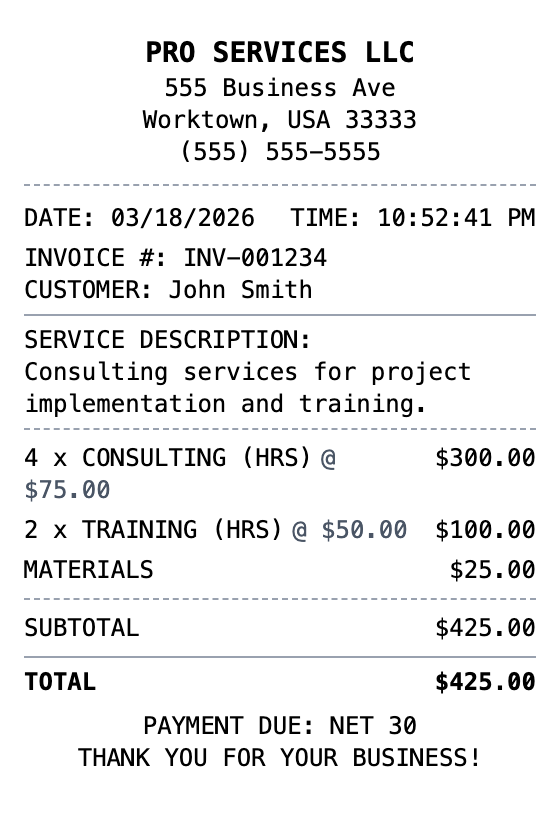
Built to Get the Details Right
Every detail is editable, from the header at the top down to the barcode.
Drag & Drop Builder
Lay out service descriptions, hourly rates, and project totals in whatever format your clients expect.
Real-time Preview
See your service invoice update as you add line items, adjust hours, and calculate totals.
Multiple Export Formats
Download as PDF for professional invoicing, PNG for quick sharing, or JPEG for email attachments.
Custom Styling
Add your business name, client details, and invoice numbers to create polished service receipts.
Barcode & QR Support
Include invoice barcodes or QR codes for quick payment links and job tracking.
Paper Styles
Choose clean white paper for professional invoices or thermal for on-site service calls.
Create a Service Receipt in Three Steps
No account needed to start building
Step 1:
Choose your template
Step 2:
Customize your receipt
Step 3:
Download and use
What You Can Do
Create receipts for any purpose
Expense Reports
Document business expenses for company reimbursement
Tax Documentation
Keep organized records for tax filing and deductions
Client Invoicing
Create professional receipts for client billing
Proof of Purchase
Generate records for warranties and returns
Budget Tracking
Monitor spending with organized receipt records
Reimbursements
Submit clear expense documentation for refunds
Frequently Asked Questions
Common questions about creating service receipts
Is MakeMyReceipt free to use?
Yes. You can build and customize receipts for free with no sign-up required. Watermark-free exports and saved receipts are available with Pro.
What file formats can I export?
You can export your receipts as PNG (high-quality images), PDF (print-ready documents), or JPEG (compressed images for smaller file sizes).
More Templates Like This One
Delivery Receipt
Package or food delivery receipt
Courier Receipt
Courier/messenger service receipt

Shipping Receipt
Package shipping receipt with tracking
Royal Mail Post Office Receipt
UK postal service receipt with shipping and tracking details
Itemized Receipt
Detailed itemized receipt with line items