
Pharmacy Receipt Generator
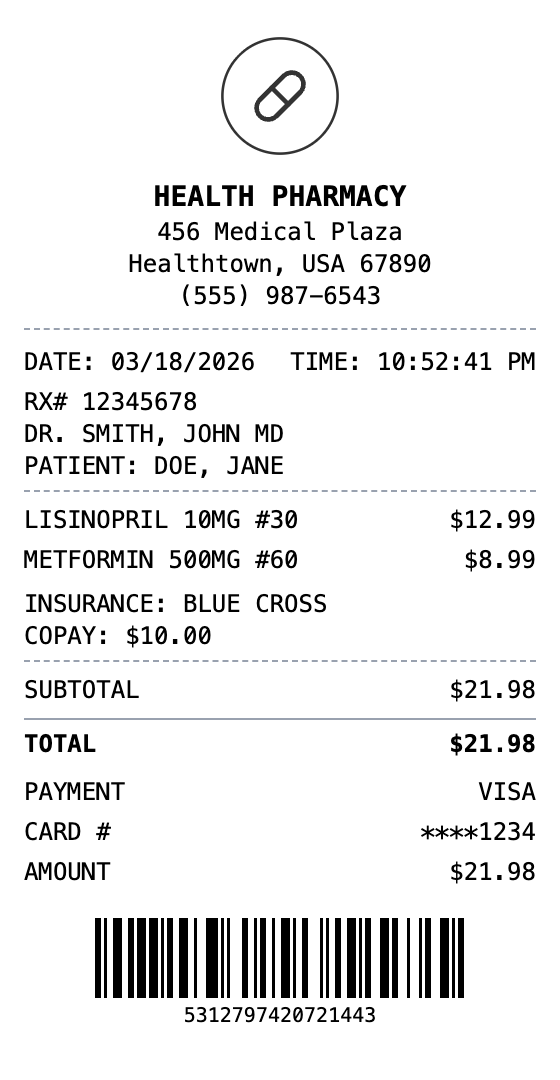
Use our professional pharmacy receipt template, complete with every detail you need, such as Rx info, insurance details, and prescription items. Perfect for keeping your medical records, mockups, training, and design projects.
Make Your Pharmacy Receipt
Built to Get the Details Right
Start from a ready-made layout, edit every field, and export in seconds.
Drag & Drop Builder
Organize prescription details, copays, and pharmacy info in whatever order works best for your needs.
Real-time Preview
Watch your pharmacy receipt come together as you add medications, dosages, and insurance information.
Multiple Export Formats
Save as PDF for insurance claims, PNG for quick records, or JPEG for email attachments.
Custom Styling
Include your pharmacy name, Rx numbers, and format everything to match professional prescription receipts.
Barcode & QR Support
Add prescription barcodes or QR codes for easy refill tracking and medication verification.
Paper Styles
Pick from thermal print style or clean white paper to match your documentation needs.
Create a Pharmacy Receipt in Three Steps
No account needed to start building
Step 1:
Choose your template
Step 2:
Customize your receipt
Step 3:
Download and use
What You Can Do
Create receipts for any purpose
HSA/FSA Claims
Document pharmacy purchases for health savings or flexible spending account reimbursement
Medical Tax Deductions
Keep pharmacy receipts organized for itemized medical expense deductions
Insurance Claims
Submit pharmacy receipts for insurance reimbursement or prior authorization
Medication Tracking
Maintain a record of prescriptions filled and costs over time
Employee Benefits
Process pharmacy expenses through employer health benefit programs
Pharmacy Training
Create sample receipts for pharmacy technician or staff training
Frequently Asked Questions
Common questions about creating pharmacy receipts
What details does a pharmacy receipt include?
Pharmacy receipts typically include the pharmacy name, patient info, Rx number, prescribing doctor, medication name and dosage, quantity, insurance copay, and total paid. Our template lets you customize all of these fields.
Are prescription items taxed on receipts?
In most US states, prescription medications are exempt from sales tax. Our pharmacy template defaults to 0% tax, but you can adjust this based on your location and whether the items are OTC or prescription.
Can I include insurance information?
Yes, use the custom message section to add insurance provider name, plan details, copay amounts, and any other insurance-related information.
What is a pharmacy receipt?
A pharmacy receipt is a printed or digital record of a prescription or over-the-counter purchase from a drugstore or pharmacy. Unlike standard retail receipts, pharmacy receipts often include prescription-specific details such as Rx numbers, prescribing physician information, patient name, medication names and dosages, insurance copay amounts, and National Drug Code (NDC) numbers. They serve as both a proof of purchase and a medical record reference, so make sure you keep them handy!
When would you need a pharmacy receipt?
Accurate pharmacy receipts are critical for insurance reimbursement claims, Health Savings Account (HSA) or Flexible Spending Account (FSA) documentation, and tax deductions for medical expenses. Patients often need them to verify that prescriptions were filled correctly, and businesses use them for employee health benefit administration. They are also useful for tracking medication costs over time.
Which fields matter most on a pharmacy receipt?
Pharmacy name, address, and phone number • Patient name and prescription (Rx) number • Prescribing physician name and DEA number • Medication name, strength, quantity, and NDC code • Insurance provider and copay/coinsurance amount • Date filled and number of refills remaining • Total paid and payment method
How to make your pharmacy receipt look right
Include Rx numbers and doctor names for realistic pharmacy documentation • Set the tax rate to 0% for prescription medications, which are tax-exempt in most states • Use the custom message section for insurance details like plan name and copay • Add a barcode with a realistic Rx number format for authenticity
Is MakeMyReceipt free to use?
Yes. You can build and customize receipts for free with no sign-up required. Watermark-free exports and saved receipts are available with Pro.
What file formats can I export?
You can export your receipts as PNG (high-quality images), PDF (print-ready documents), or JPEG (compressed images for smaller file sizes).
More Templates Like This One

CVS Receipt
Pharmacy receipt with rewards and coupons section

Walgreens Receipt
Drugstore receipt with manager info and product serials
Medical Receipt
Medical service receipt with procedure codes

Doctor Receipt
Medical office visit receipt

Grocery Receipt
Supermarket grocery shopping receipt