
Swatch Receipt Generator
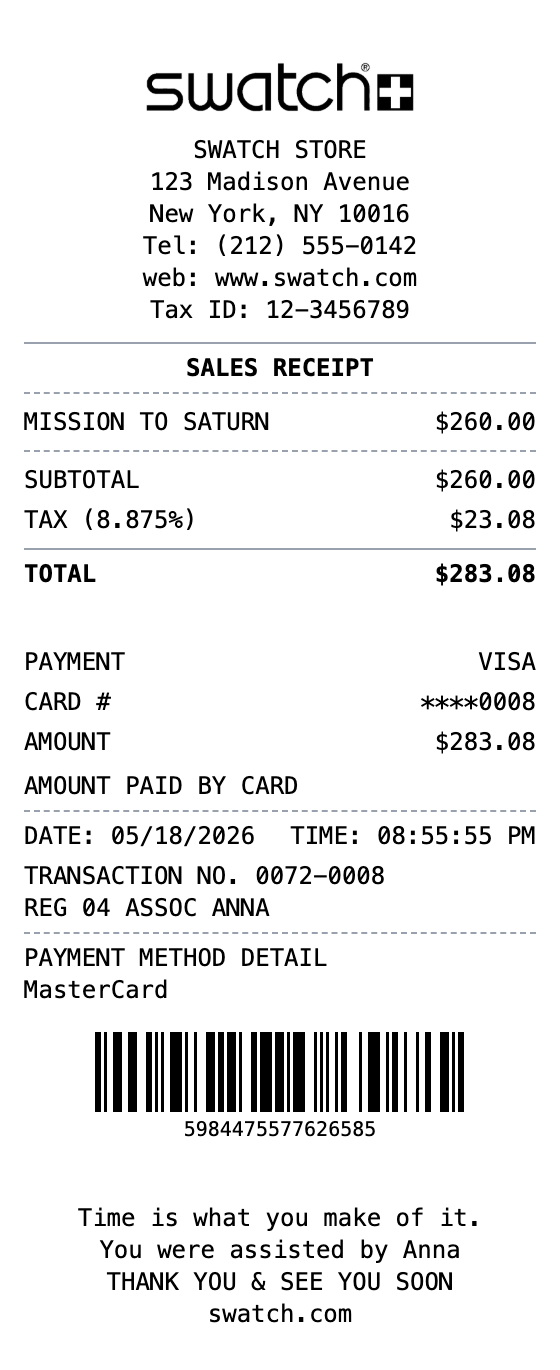
Generate professional Swatch receipts with watch model details, store location, VAT, and barcode. Perfect for Swiss watch boutique mockups and records.
Generate Your Swatch Receipt
Built to Get the Details Right
Fonts, spacing, and layout are modeled on the real thing, so your export holds up.
Swiss Watch Boutique Style
Authentic Swatch receipt layout with store details, tax breakdown, and thermal print look.
Watch Model Details
Pre-loaded with Swatch collection items like Mission to Saturn to mirror real boutique purchases.
Tax & Totals
Includes subtotal, sales tax, and total with a configurable tax rate to match your state or city.
Transaction Info
Transaction number, register, and associate name lines mirror real Swatch sales receipts.
Barcode & Reference Number
Adds a Code128 barcode and transaction reference like the bottom of a real Swatch receipt.
Multiple Export Formats
Download as PNG, PDF, or JPEG for mockups, records, or design references.
Making Your Swatch Receipt, Step by Step
Pick, edit, download. That's the entire workflow.
Step 1:
Pick your template
Step 2:
Fill in the details
Step 3:
Export your receipt
Common Uses for a Swatch Receipt
A few of the ways people put this template to work
Warranty Records
Keep a clean copy of your Swatch purchase for warranty and service claims
Expense Tracking
Log watch purchases for personal budgeting or business expense reports
Design Mockups
Create realistic Swiss watch boutique receipt mockups for retail and app designs
Training Materials
Use sample Swatch receipts for retail training or POS system documentation
Swatch Receipt FAQs
Everything else you might want to know
What details are on a Swatch receipt?
A Swatch receipt typically includes the store address, the sales receipt heading, the watch model and price, subtotal and tax, total, payment details, date and time, transaction number, and a barcode.
Can I customize the watch model on the receipt?
Yes, you can edit the item description and price to any Swatch model, including limited editions and collaborations.
Can I change the tax rate?
Yes, the template ships with a US sales tax rate that you can change to match any state, city, or country.
What export formats are available?
Export your Swatch receipt as PNG, JPEG, or PDF. All formats keep the thermal receipt styling intact.
What is a swatch receipt?
A Swatch receipt is the transaction record issued by Swatch boutiques when you buy a watch. It lists the store and contact info, the watch model purchased, subtotal and sales tax, total paid, payment method, transaction number, and a barcode for reference.
Why would you recreate a swatch receipt?
Swatch receipts are useful for warranty registration, expense tracking, returns and exchanges, insurance documentation on higher-end pieces, and as design references for retail or POS mockups featuring Swiss watch boutiques.
What information goes on a swatch receipt?
Store name, address, and tax ID • Sales receipt heading • Watch model, quantity, and price • Subtotal, tax rate, and total • Payment method and card details • Date, time, and transaction number • Register and associate name • Barcode for receipt reference
How to make your swatch receipt look right
Use the exact watch collection name (e.g. Mission to Saturn) for realism • Adjust the tax rate to match your state or city sales tax • Include the SALES RECEIPT header above the items list • Add a transaction number near the bottom to mirror real Swatch receipts
Is MakeMyReceipt free to use?
Yes. You can build and customize receipts for free with no sign-up required. Watermark-free exports and saved receipts are available with Pro.
What file formats can I export?
You can export your receipts as PNG (high-quality images), PDF (print-ready documents), or JPEG (compressed images for smaller file sizes).
Related Receipt Templates

Convenience Store Receipt
Standard retail receipt with items, tax, and payment

Pharmacy Receipt
Pharmacy receipt with Rx info and insurance details
Auto Service Receipt
Auto shop receipt with services, parts, and labor

Restaurant Receipt
Restaurant receipt with items, tax, and tip line
Service Receipt
Service invoice with description, hours, and rate