
Sam's Club Receipt Generator
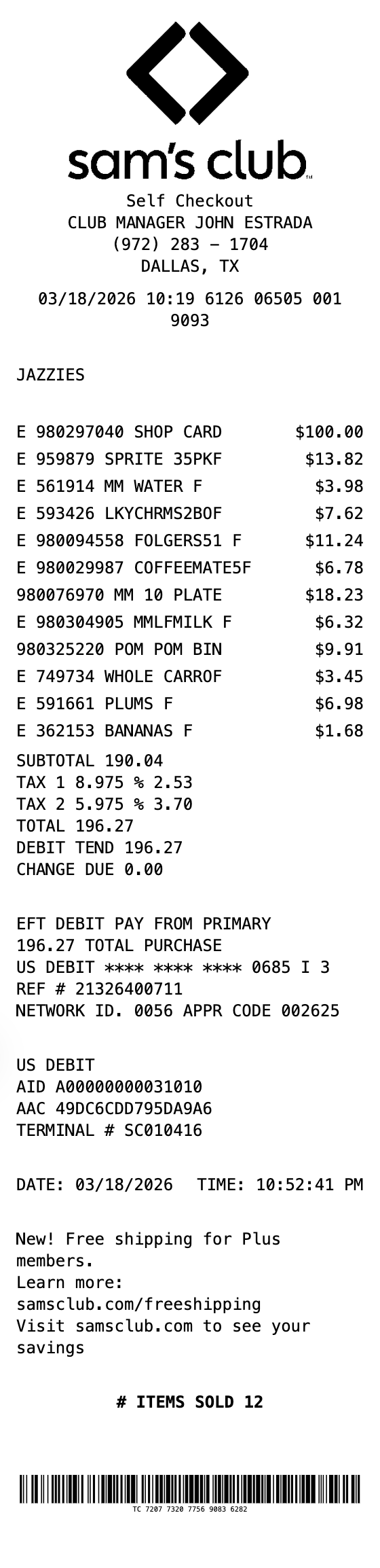
Create realistic Sam's Club warehouse receipts with member info, item codes, dual tax breakdown, EFT debit details, and barcodes. Perfect for wholesale club mockups.
Start Your Sam's Club Receipt
The Quick Way to Build a Sam's Club Receipt
Start from a ready-made layout, edit every field, and export in seconds.
Warehouse Club Format
Authentic Sam's Club receipt layout with self checkout header, club manager, and member name display.
Dual Tax Rates
Show two separate tax rates (Tax 1 and Tax 2) with percentages and amounts, matching real Sam's Club receipts.
Item Code Display
Items shown with E prefix for taxable items, product codes, abbreviated descriptions, and tax flag indicators.
EFT Payment Details
Complete EFT debit block with card masking, reference numbers, network ID, approval codes, AID, and terminal info.
Items Sold Counter
Bold items sold count at the bottom, just like authentic warehouse club receipts.
Transaction Barcode
TC# barcode at the bottom with the full transaction code number displayed below.
How to Generate Your Sam's Club Receipt
Three simple steps to generate professional receipts
Step 1:
Open the template
Step 2:
Edit every field
Step 3:
Download your file
When You Might Need One
From bookkeeping to mockups, it covers a lot of ground
Expense Reports
Document Sam's Club bulk purchases for business expense reimbursement
Business Supplies
Create receipts for office and business supply purchases from warehouse clubs
Budget Tracking
Keep organized records of wholesale club spending for monthly budgets
Design Mockups
Generate realistic warehouse club receipt mockups for POS or app designs
Training Materials
Use sample receipts for cashier training or Sam's Club POS documentation
Membership Reference
Reference receipt format for warehouse club membership and shopping records
Questions People Ask
Quick answers about this template
What does a Sam's Club receipt look like?
A Sam's Club receipt features the diamond logo at top, Self Checkout or register type, club manager name, phone number, city/state, a transaction metadata line, member name, itemized products with E-prefix codes and tax flags, dual tax rate breakdown, EFT debit payment details with AID and terminal info, and a TC# barcode at the bottom.
Can I customize the items and tax rates?
Yes, you can edit all item descriptions, codes, prices, and both tax rates. Add or remove items, change the member name, update payment details, and modify the club manager info to match your needs.
What are the tax flags on Sam's Club receipts?
Sam's Club receipts use letter flags next to prices: R indicates regular taxable items, T indicates items taxed at the second tax rate, N indicates non-taxable items, and F before the price indicates food stamp eligible items.
Is MakeMyReceipt free to use?
Yes. You can build and customize receipts for free with no sign-up required. Watermark-free exports and saved receipts are available with Pro.
What file formats can I export?
You can export your receipts as PNG (high-quality images), PDF (print-ready documents), or JPEG (compressed images for smaller file sizes).
You Might Also Need

Convenience Store Receipt
Standard retail receipt with items, tax, and payment

Pharmacy Receipt
Pharmacy receipt with Rx info and insurance details
Auto Service Receipt
Auto shop receipt with services, parts, and labor

Restaurant Receipt
Restaurant receipt with items, tax, and tip line
Service Receipt
Service invoice with description, hours, and rate