
Neiman Marcus Receipt Generator
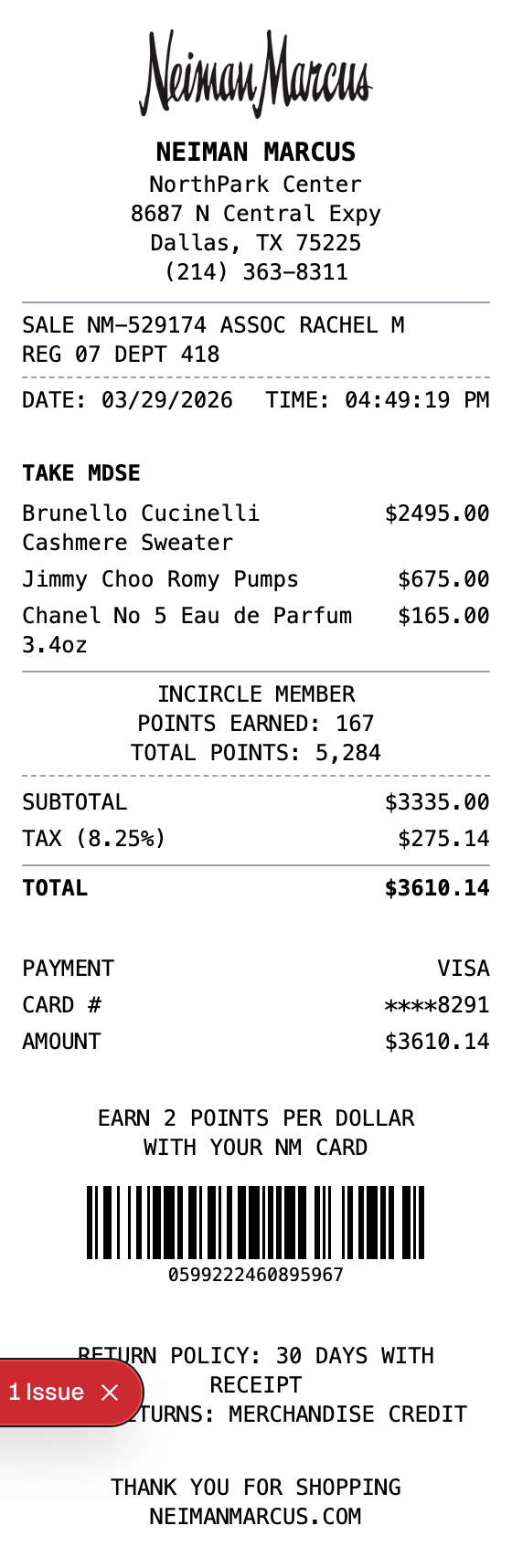
Generate professional Neiman Marcus receipts with luxury designer items, InCircle rewards points, and detailed transaction information. Perfect for luxury retail mockups.
Create Your Neiman Marcus Receipt
Built to Get the Details Right
Start from a ready-made layout, edit every field, and export in seconds.
Luxury Store Format
Authentic Neiman Marcus receipt layout with logo, store location, and department details.
Designer Products
Pre-loaded with luxury brand items like Brunello Cucinelli, Jimmy Choo, and Chanel.
InCircle Rewards
Includes InCircle loyalty program with points earned and total points balance.
Transaction Details
Features sale number, associate name, register, and department codes.
Tax Calculation
Automatic subtotal and tax calculation with configurable tax rate.
Multiple Export Formats
Download as PNG, PDF, or JPEG - perfect for mockups and design projects.
How to Make a Neiman Marcus Receipt
The whole process takes about a minute
Step 1:
Start from this template
Step 2:
Make it yours
Step 3:
Save and download
Where a Neiman Marcus Receipt Comes in Handy
Real situations where this template gets used
Expense Tracking
Keep organized records of luxury department store purchases for budgeting
Return Documentation
Create receipt records for returns and exchanges within the 30-day policy
Design Mockups
Create realistic luxury retail receipt mockups for POS or app designs
Training Materials
Use sample receipts for retail training or POS system documentation
Common Questions, Answered
The details people usually ask about
What details are on a Neiman Marcus receipt?
A Neiman Marcus receipt includes the store logo, location details, sale and associate info, itemized designer merchandise, InCircle rewards points, subtotal with tax, payment details, return policy, and a barcode.
Can I customize the items on the receipt?
Yes, you can add, remove, or edit any item. Change descriptions, quantities, and prices to match your needs.
Does the template include InCircle rewards?
Yes, the template includes an InCircle member section showing points earned and total points balance, matching the real Neiman Marcus loyalty program format.
What export formats are available?
Export your Neiman Marcus receipt as PNG, JPEG, or PDF. All formats maintain thermal receipt styling.
What does a neiman marcus receipt show?
A Neiman Marcus receipt is the transaction record provided by Neiman Marcus luxury department stores. It includes the store location, associate details, itemized luxury merchandise, InCircle rewards points, tax calculations, and payment information.
Why do you need a neiman marcus receipt?
Neiman Marcus receipt records are useful for tracking luxury purchases, managing returns within the 30-day policy, monitoring InCircle rewards points, and keeping organized records of high-end department store spending for budgeting or expense reporting.
Which fields matter most on a neiman marcus receipt?
Store name, location, and phone number • Sale number and associate name • Register and department codes • Itemized designer merchandise with prices • InCircle rewards points earned and balance • Subtotal, tax rate, and total • Payment method and card details • Return policy information • Barcode for transaction reference
Tips for creating your neiman marcus receipt
Include specific designer brand names for realistic luxury items • Add InCircle member points to match loyalty program format • Use the standard 8.25% Texas tax rate or adjust for your location • Include the TAKE MDSE header above items as shown on real receipts
Is MakeMyReceipt free to use?
Yes. You can build and customize receipts for free with no sign-up required. Watermark-free exports and saved receipts are available with Pro.
What file formats can I export?
You can export your receipts as PNG (high-quality images), PDF (print-ready documents), or JPEG (compressed images for smaller file sizes).
Similar Receipt Templates

Convenience Store Receipt
Standard retail receipt with items, tax, and payment

Pharmacy Receipt
Pharmacy receipt with Rx info and insurance details
Auto Service Receipt
Auto shop receipt with services, parts, and labor

Restaurant Receipt
Restaurant receipt with items, tax, and tip line
Service Receipt
Service invoice with description, hours, and rate