
Krispy Kreme Receipt Generator
Generate realistic Krispy Kreme doughnut shop receipts with menu items, tax breakdown, and payment details. Perfect for mockups and design projects.
Start Your Krispy Kreme Receipt
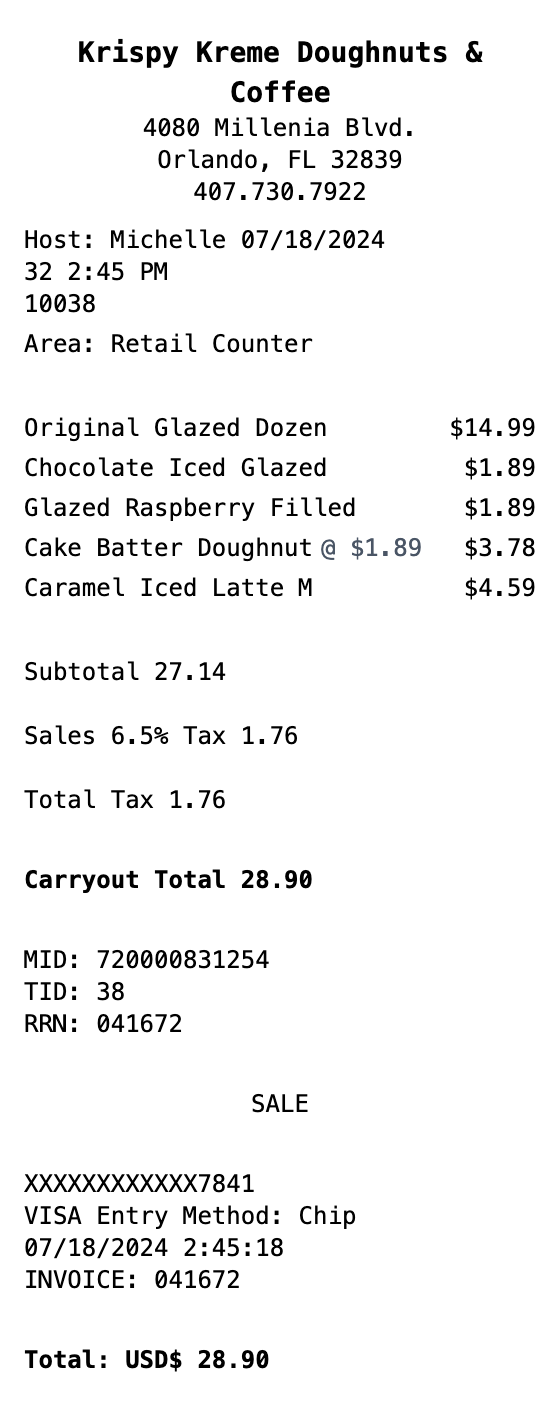
Built to Get the Details Right
Fonts, spacing, and layout are modeled on the real thing, so your export holds up.
Doughnut Shop Format
Authentic Krispy Kreme receipt layout with host name, area, and order type displayed.
Menu Items
Add glazed doughnuts, filled varieties, specialty items, and coffee drinks with prices.
Tax Breakdown
Show sales tax percentage and total tax amount matching real doughnut shop receipts.
Order Type Display
Include Carryout, Drive Thru, or Retail Counter total with bold formatting.
Payment Details
Card type, entry method, MID/TID/RRN terminal identifiers, and invoice number.
Multiple Export Formats
Download as PNG, PDF, or JPEG - perfect for mockups and design projects.
How to Generate Your Krispy Kreme Receipt
Three simple steps to generate professional receipts
Step 1:
Open the template
Step 2:
Edit every field
Step 3:
Download your file
When You Might Need One
From bookkeeping to mockups, it covers a lot of ground
Expense Reports
Document Krispy Kreme purchases for office catering or business expense reimbursement
Business Catering
Create receipts for doughnut orders used in corporate meetings and events
Budget Tracking
Keep organized records of bakery spending for monthly budgets
Design Mockups
Generate realistic doughnut shop receipt mockups for POS or app designs
Training Materials
Use sample receipts for cashier training or POS system documentation
Franchise Reference
Reference receipt format for doughnut shop franchise setup and branding
Questions People Ask
Quick answers about this template
What details are on a Krispy Kreme receipt?
A Krispy Kreme receipt includes the store name and location, host (cashier) name, date/time, order area (Drive Thru, Retail Counter, etc.), itemized doughnuts and drinks with prices, subtotal, sales tax breakdown, total, and payment card details with terminal identifiers.
Can I customize the doughnut items and prices?
Yes, you can edit all menu items, quantities, prices, tax rates, and payment details. Add any Krispy Kreme doughnut variety, coffee drink, or combo pack to match your needs.
Does this include the payment terminal details?
Yes, the template includes MID, TID, and RRN fields along with card type, entry method, and invoice number matching real Krispy Kreme POS receipts.
Is MakeMyReceipt free to use?
Yes. You can build and customize receipts for free with no sign-up required. Watermark-free exports and saved receipts are available with Pro.
What file formats can I export?
You can export your receipts as PNG (high-quality images), PDF (print-ready documents), or JPEG (compressed images for smaller file sizes).
You Might Also Need

Convenience Store Receipt
Standard retail receipt with items, tax, and payment

Pharmacy Receipt
Pharmacy receipt with Rx info and insurance details
Auto Service Receipt
Auto shop receipt with services, parts, and labor

Restaurant Receipt
Restaurant receipt with items, tax, and tip line
Service Receipt
Service invoice with description, hours, and rate