
Store Receipt Generator
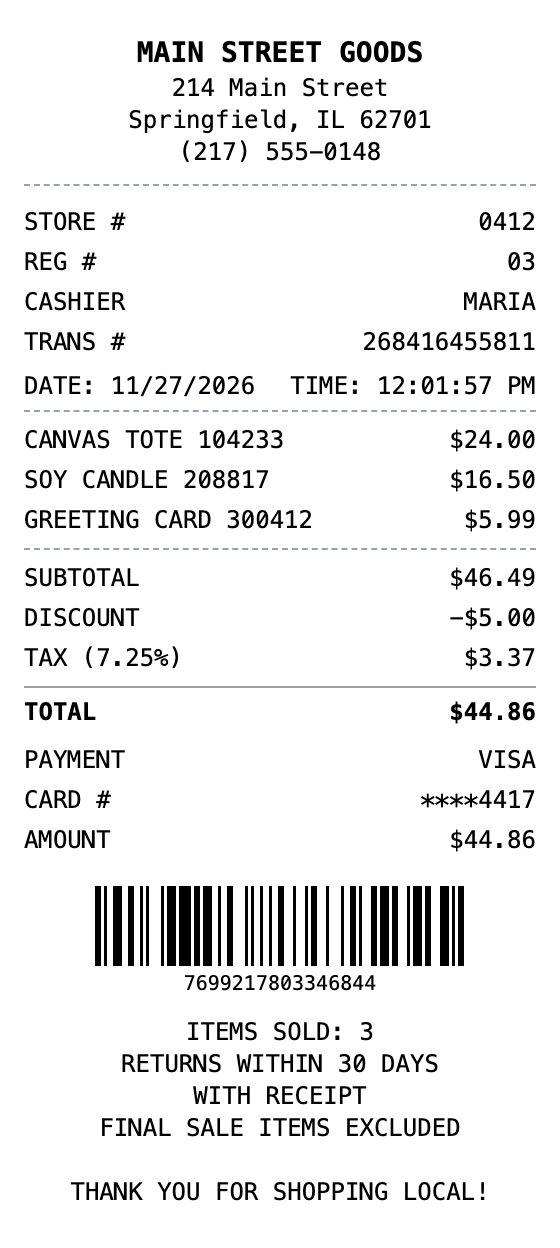
Build a retail store receipt laid out the way a real register prints one: store and register numbers, the cashier, each item with its SKU, a savings line, tax, the card tender, and the return policy at the bottom. Made for independent shops, pop-ups, and market sellers who need a proper customer receipt without a full point-of-sale system.
Make Your Store Receipt
Built to Get the Details Right
Fonts, spacing, and layout are modeled on the real thing, so your export holds up.
Register-Style Layout
Store number, register, cashier, and transaction number print at the top, the way a retail POS lays them out.
Real-time Preview
Watch the subtotal, savings, tax, and total update as you add products and change prices.
Multiple Export Formats
Download a PDF to print or email to a customer, or a PNG or JPEG for your own records.
Your Store, Your Details
Add your shop name, address, logo, and your own return policy wording at the bottom.
Barcode for Returns
Include a transaction barcode so a returned item can be matched to the original sale.
Paper Styles
Use thermal paper for a register look, or white paper for a clean printed copy.
Create a Store Receipt in Three Steps
No account needed to start building
Step 1:
Choose your template
Step 2:
Customize your receipt
Step 3:
Download and use
Anatomy of a Store Receipt
Every field you'll find on the real thing, and why it's there.
- Store header
- The shop name, street address, and phone number, so the customer knows exactly where the purchase was made.
- Register line
- Store number, register number, cashier, and transaction number. Together with the date and time, these identify one specific sale.
- Item lines
- One line per product with a short description and its SKU or item number, the quantity, and the price.
- Savings and totals
- Any discount on its own line, then the subtotal, sales tax, and the total charged.
- Tender block
- How the customer paid: card type with only the last digits of the card number, or cash given and change due.
- Footer
- Items sold, the return and exchange policy, a barcode carrying the transaction number, and a thank-you line.
What You Can Do
Create receipts for any purpose
Independent Shops
Give customers a register-style receipt when your card reader does not print one
Pop-ups and Markets
Hand out proper receipts at craft fairs, markets, and temporary shops
Returns and Exchanges
Keep a record that lets you verify a returned item against the original sale
Bookkeeping
Track daily sales by store, register, and transaction number
Cashier Training
Use sample receipts to train new staff on reading and processing returns
Design Mockups
Create realistic retail receipt mockups for app, film, or website projects
Frequently Asked Questions
Common questions about creating store receipts
What should a store receipt include?
A store receipt should show the store name and address, the store and register numbers, the cashier, a transaction number, the date and time, each item with its price, any discounts, the subtotal, sales tax, total, how the customer paid, and the return policy.
What is the difference between a store receipt and a sales receipt?
They record the same thing, a completed sale. A store receipt follows the retail register format: it identifies the store, register, and cashier, lists items by SKU, and ends with a return policy, because retail stores expect returns and exchanges. A general sales receipt is simpler and fits any business selling goods or services.
Should a store receipt show the full card number?
No. US law limits printed receipts to no more than the last five digits of the card number and bars printing the expiration date. Most stores print only the last four digits.
What does a store receipt show?
A store receipt is the register printout a retail shop hands over at checkout. It is built around the transaction: which store, which register and cashier, when, what was sold, what it cost after any savings, how it was paid, and what the return policy is. That last part is what separates a store receipt from a generic sales receipt. A store expects some of what it sells to come back, so the receipt is laid out to make a return easy to verify later.
Why do you need a store receipt?
Customers rely on the store receipt for returns, exchanges, warranty claims, and expense reports, and many shops will not take a return without one. For the seller, the store and register numbers plus the transaction number tie each receipt to a specific sale in your books. Independent boutiques, gift shops, pop-ups, and market stalls often take card payments on a phone reader that sends no printed receipt at all, so a properly laid out store receipt fills that gap.
What are the key fields on a store receipt?
Store name, address, and phone number • Store number, register number, and cashier • Transaction number and date and time of sale • Each item with a short description, SKU, quantity, and price • Savings or discount line, subtotal, sales tax, and total • Tender type with the masked card number, or cash given and change due • Item count, return policy, and a transaction barcode
How to make your store receipt look right
Print the SKU or item number on each line so a returned item can be matched to its sale • Show discounts as their own savings line rather than lowering the item price, so the original price stays on record • Put your actual return window and any final-sale exclusions in the footer • Use your local sales tax rate, and check whether any items you sell are exempt
Is MakeMyReceipt free to use?
Yes. You can build and customize receipts for free with no sign-up required. Watermark-free exports and saved receipts are available with Pro.
What file formats can I export?
You can export your receipts as PNG (high-quality images), PDF (print-ready documents), or JPEG (compressed images for smaller file sizes).
More Templates Like This One
Sales Receipt
General sales transaction receipt

Convenience Store Receipt
Standard retail receipt with items, tax, and payment

Pharmacy Receipt
Pharmacy receipt with Rx info and insurance details
Auto Service Receipt
Auto shop receipt with services, parts, and labor

Restaurant Receipt
Restaurant receipt with items, tax, and tip line