
Credit Card Receipt Explained: AID, Auth Code, TVR and Every Code on the Slip
What the AID number, approval code, entry method, TVR, TSI and cryptogram lines on a card receipt mean, which AID belongs to which card, and why your last four digits might not match.
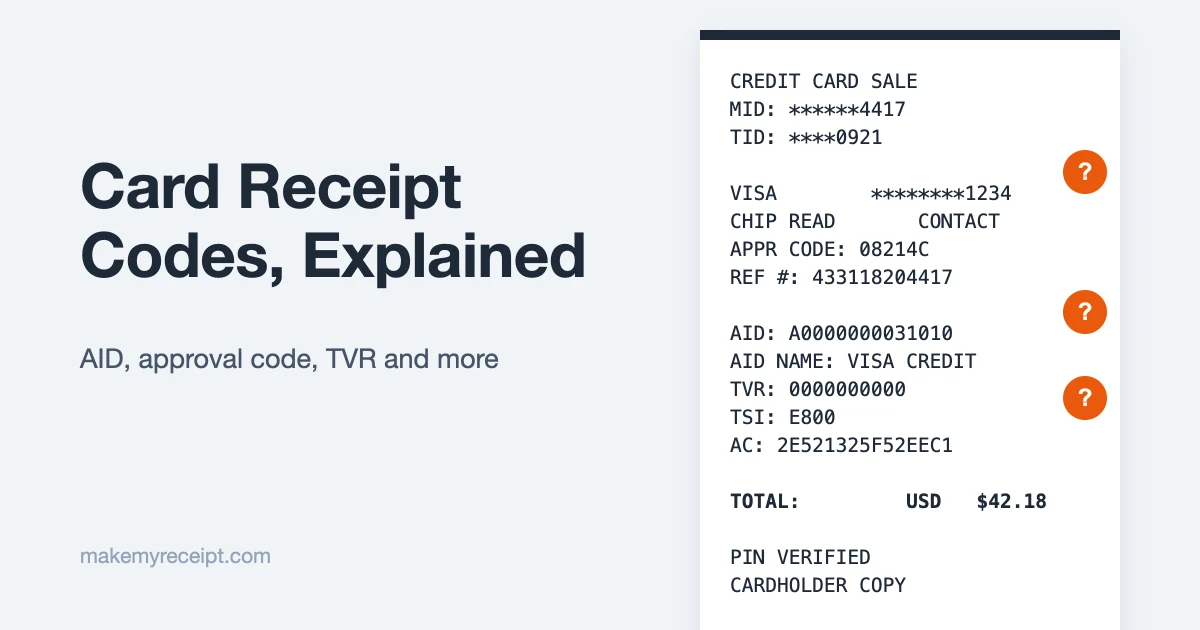
A card receipt is two receipts glued together. The top half is the store talking: what you bought, the tax, the total. The bottom half is the payment network talking, and it speaks in codes like AID, TVR, TSI and AC that nobody explains at the register. People search for those codes by the thousands, usually holding a slip that says something like AID: A0000000031010 and wondering if it means something went wrong.
It almost never does. Those lines are the chip transaction's paperwork, and processors make merchants print them so the sale can be traced and audited later. Once you know which lines are for you and which are for a payment technician, a card slip reads in about ten seconds.
This guide decodes the payment block field by field. For the store half of the receipt, see how to read a receipt, and for one-line definitions of every abbreviation, our receipt abbreviations glossary.
Why Card Receipts Print All This
When a store's register gets certified to accept chip cards, the processor hands over a list of fields the receipt must carry. Global Payments' EMV receipt spec for its OpenEdge platform is typical. For an approved sale it requires the merchant name and address, merchant ID, terminal ID, date and time, card type, masked card number, entry method, approval code, AID, AID name, TVR, AC, ATC, TSI, response code, transaction reference number and the approved total. It also requires a copy label: the store's copy must say "Merchant Copy", and yours must say "Cardholder Copy" along with "Retain this copy for statement verification".
That last line is the point of the whole slip. The codes exist so that you, the store and the bank can match this piece of paper to one exact line on your statement.
Transaction type
What kind of transaction this was: a sale, a refund (RETURN or CREDIT), or a VOID that cancelled a sale before it settled.
Transaction type
What kind of transaction this was: a sale, a refund (RETURN or CREDIT), or a VOID that cancelled a sale before it settled.
The Fields You Actually Use
Five lines on a card slip matter to a normal person. The rest can be ignored.
| Line on the slip | What it means | When you need it |
|---|---|---|
Masked card number (************1234) | The last digits of the card or device that paid | Matching the charge to the right card |
APPR, AUTH or AP CODE | The approval code your card issuer sent back | Disputes and refunds |
REF #, TRN REF or RRN | The processor's reference number for this sale | Finding the transaction with the store or bank |
Entry method (CHIP, CONTACTLESS, SWIPED) | How the card was read | Fraud claims |
| Total and date/time | The amount and moment the charge was approved | Matching it to your statement |
The approval code is usually six characters, letters and numbers. It is the issuer's "yes" at the moment of sale. It is not unique across the world and it is not a transaction ID, so on its own it can't identify your purchase. Combined with the date, amount and the last digits of the card, it pins the sale down exactly.
The reference number is the processor's ID for the transaction, and it is often the most useful number on the slip. It is what a merchant's payment provider searches by when you call about a charge.
AID: Which Card Paid
AID stands for Application Identifier. A chip card can carry more than one payment application, and the AID names the one the terminal picked. AIDs are registered through EMVCo, the body that runs the chip card standard. The first ten characters identify the network and the rest identify the product.
These are the AIDs you're most likely to see on a US receipt, as listed in EFTlab's AID registry:
| AID on the receipt | Network and product |
|---|---|
| A0000000031010 | Visa credit or debit (classic) |
| A0000000032010 | Visa Electron |
| A0000000033010 | Visa Interlink |
| A0000000980840 | Visa US Common Debit |
| A0000000041010 | Mastercard credit or debit |
| A0000000043060 | Maestro debit |
| A0000000042203 | Mastercard US Maestro (common debit) |
| A000000025... | American Express |
| A0000001523010 | Discover |
| A0000001524010 | Discover US Common Debit |
| A0000000651010 | JCB |
| A000000333010101 / ...102 | UnionPay debit / credit |
The one that confuses people is the US Common Debit AID. Most US debit cards carry two applications: the brand's global AID and a common debit AID. If the terminal picks the common one (A0000000980840 for Visa, A0000000042203 for Mastercard), the store can route your debit purchase over a different US debit network instead of Visa or Mastercard's own. Nothing about the charge is different for you. It is a routing choice, usually made because it costs the store less.
Right under the AID, most slips print an AID name or application label, such as VISA CREDIT, US DEBIT or MASTERCARD. That's the same information in plain English.
Type the AID line from your card slip, for example A0000000031010.
Entry Method: How the Card Was Read
The entry method tells you how your card details got into the terminal. It matters most when you're disputing a charge you don't recognize.
- CHIP (or CHIP READ, ICC, CONTACT): the card was inserted and the chip did the transaction.
- CONTACTLESS (or TAP, CTLS): a card, phone or watch was tapped.
- SWIPED (or MAG STRIPE): the magnetic stripe was read. This is the easiest method to counterfeit.
- MANUAL or KEYED: someone typed the card number in.
- FALLBACK: the chip failed and the terminal fell back to the stripe. A fallback on a card that works fine elsewhere is worth a second look.
If you see a sale on your statement that you didn't make, the entry method on the store's copy is one of the first things a card issuer will ask about. A chip or contactless read means the physical card or your device was there; a keyed or swiped sale is a different story.
Why Your Last Four Digits Might Not Match
If you paid by phone or watch, the masked number on the receipt often won't match the card in your wallet. Apple Pay and similar wallets replace your real card number with a Device Account Number created for that card on that device, and the receipt prints the last four of the device number. Westpac's Apple Pay FAQ explains where to find it: on the card details screen in Apple Wallet.
This trips people up at returns. A cashier looking for a tap-to-pay purchase needs the device number's last four, not the card's. If you add the card to a new phone, it gets a new device number, so old receipts and new ones won't match either.
The Masked Card Number Is the Law
Your full card number never belongs on a receipt. Under the Fair and Accurate Credit Transactions Act, a merchant can't print more than the last 5 digits of the card number or the expiration date on a receipt given to you at the point of sale. Most stores go further and print only the last four.
So if a printed receipt ever shows your expiration date or most of your card number, that's not a quirk. The store's register is out of compliance, and that receipt deserves a shredder.
The Technician Block: TVR, TSI, AC and ATC
The dense hex lines near the bottom are for whoever has to troubleshoot or audit the terminal. Here's what each one is, so you can safely ignore it.
- TVR (Terminal Verification Results): a 10-character field where each bit records a check the terminal ran and whether it failed, such as an expired card or a PIN problem.
0000000000is normal. It means no checks failed. - TSI (Transaction Status Information): records which steps of the chip transaction were performed.
E800and6800are common healthy values. - AC (Application Cryptogram): a one-time code the chip generated for this transaction. It's what makes a chip card hard to clone, because the code can't be reused. Some slips label its type: TC (transaction certificate, approved), ARQC (the card asked the bank to decide online) or AAC (declined).
- ATC (Application Transaction Counter): a running count of transactions that chip has made. It goes up by one each time.
One naming trap: the TC in a chip-card block is the transaction certificate. It is not the TC# printed at the bottom of a Walmart receipt, which is Walmart's own transaction code. Our Walmart receipt codes guide covers that one.
Signature Lines and the Fine Print
Many slips still print an X______ line and the sentence "I agree to pay above total amount according to card issuer agreement". That's left over from when signatures were how cards were verified. Mastercard, Discover, American Express and Visa dropped the signature requirement for chip and contactless sales in North America in April 2018. Now the chip and, sometimes, a PIN do the job. When a PIN was used, receipts often print PIN VERIFIED. When nothing was needed, some print NO SIGNATURE REQUIRED or NO CVM, short for no cardholder verification method.
When the Slip Earns Its Keep: Disputes
The card slip is most valuable when something goes wrong with the charge: a double charge, a wrong amount, a refund that never landed. You have a clock to watch.
- Credit cards: under the Fair Credit Billing Act, your written dispute has to reach the card issuer within sixty days after it sent the first statement showing the error.
- Debit cards: under Regulation E, you have to tell your bank no later than 60 days after it sent the statement with the error.
In both cases, the approval code, reference number, date, amount and masked card number from the slip are exactly what the bank needs to find the transaction. Snap a photo of any card receipt you might need later, because thermal paper fades. Our guide to how long to keep receipts covers how long it's worth holding on to them.
If you run a small business and write receipts for card payments taken on a phone reader or a standalone terminal, the same fields apply. The customer's copy should carry the masked card number, the approval code and a reference number. Our credit card receipt template is laid out with those payment lines in the usual order.
Ready to create your receipt?
Try our free receipt maker with customizable templates.
Open Receipt Builder