
How to Read a Receipt: Every Code and Letter Explained
Learn how to read any receipt: tax letter codes, ST# OP# TE# TR#, APPR and AID, PLU numbers, and the barcode. Includes a labeled diagram and code tables.
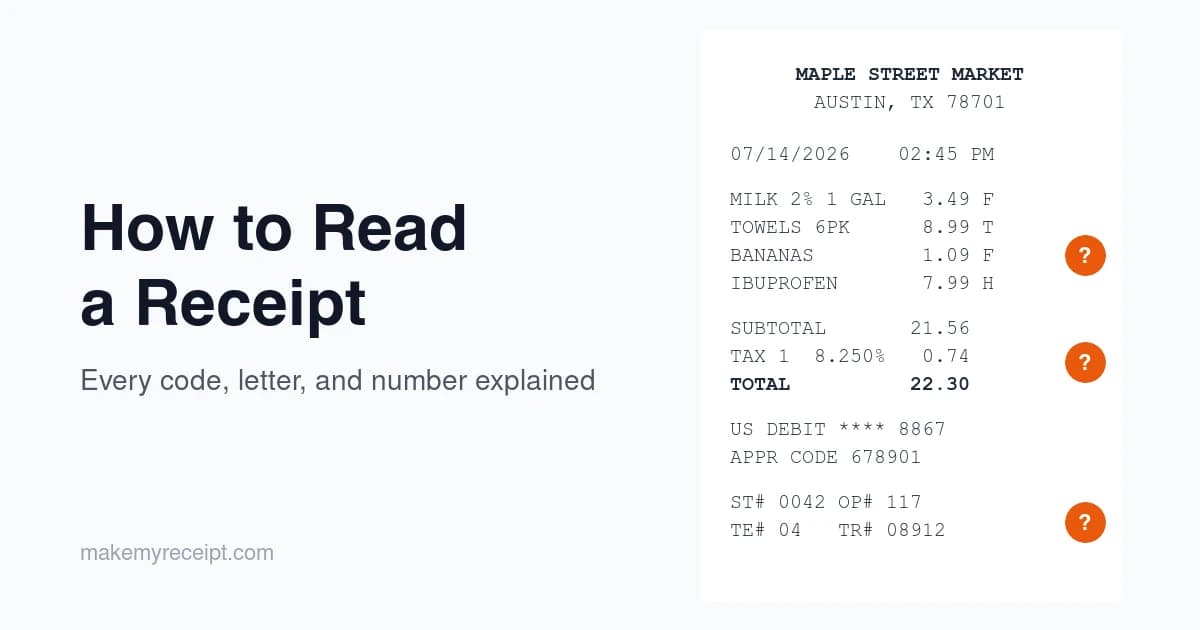
To read a receipt, work top to bottom through four zones: the header (who sold it), the body (what you bought and how each item was taxed), the money block (what you paid and how), and the footer (the transaction numbers and barcode that identify the sale). Learning how to read a receipt, including all the abbreviations and single-letter codes, mostly means learning what each zone does, and, just as important, which codes are standardized and which ones are folklore.
Here's the honest version most guides skip: the letters and codes on receipts are not standardized. Each retailer's register system invents its own, shaped by state and local tax law. We maintain receipt templates for more than 190 US retailer formats at MakeMyReceipt, and the clearest lesson from rebuilding all of them is that the same letter routinely means different things at different chains. This guide walks the anatomy top to bottom, tells you which meanings you can trust, and shows you a two minute trick to decode your own store's letters.
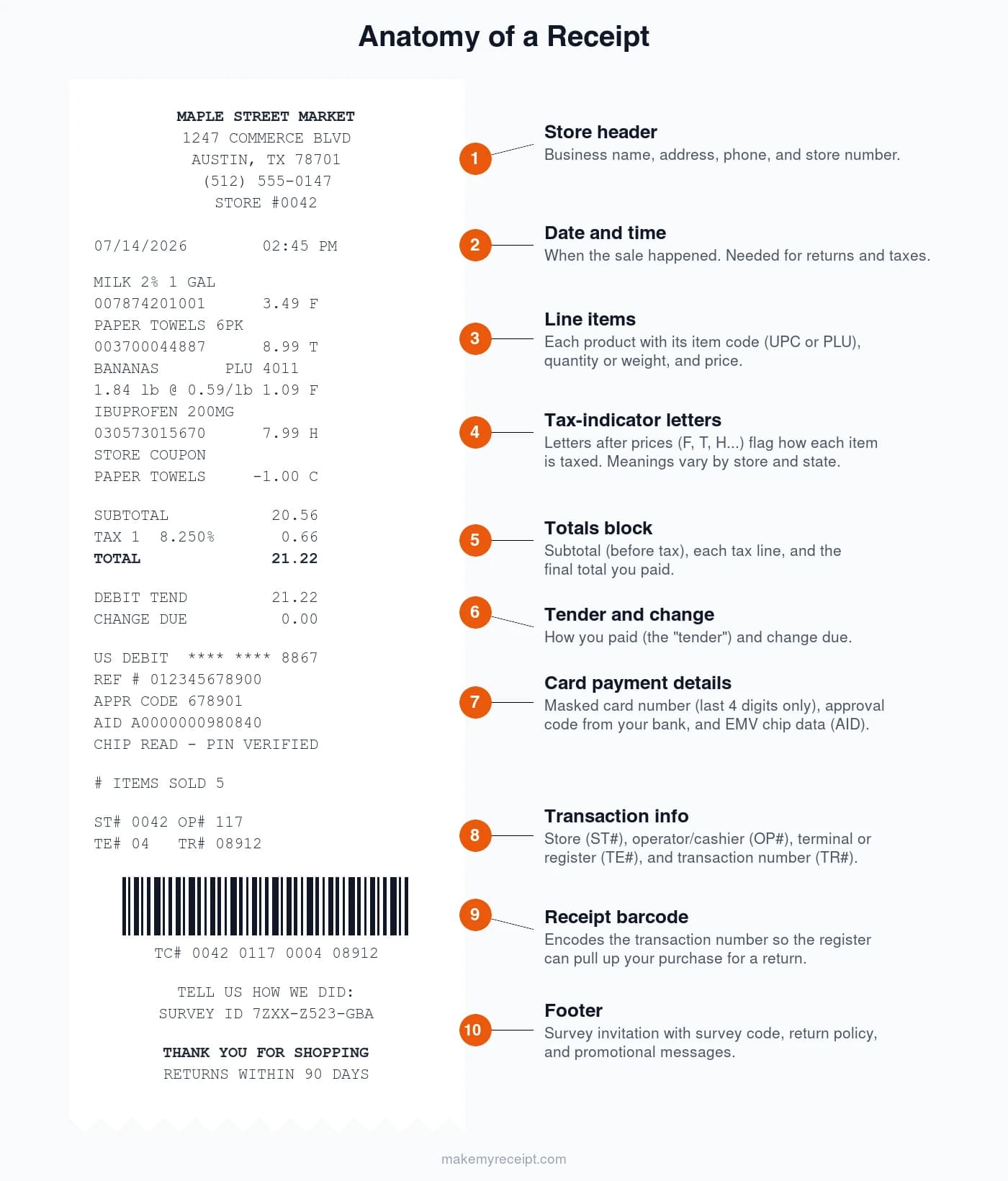
Receipt Anatomy: The Four Zones
Receipts vary by store, but nearly every US register receipt is built from four zones, printed in this order:
| Zone | What's in it |
|---|---|
| Header | Store name, address, phone, store number |
| Body | Date/time, line items with item codes, prices, and tax flags |
| Money block | Subtotal, tax lines, total, tender, change, card details |
| Footer | Transaction numbers, barcode, survey invite, return policy |
Everything below follows that top-to-bottom order, so you can hold a real receipt next to this guide and match it line by line.
The Store Header
The top block identifies who sold you the item: business name, street address, phone number, and usually a store number (Walmart prints it as ST#, and many chains repeat it near the bottom). Some chains add the store manager's name or the website.
The header matters more than it looks. For business expenses, the IRS expects supporting documents to show the amount, date, place, and nature of the purchase, and the header is what establishes the "place" part. Our guide to IRS receipt requirements covers exactly what a receipt needs to survive an audit.
Right below the header (sometimes above the items, sometimes at the bottom) sits the date and time of the transaction. Return windows, warranty claims, and expense reports all key off this line.
Line Items: UPC, PLU, and SKU Codes
The body lists each item, usually as an abbreviated name, an item code, and a price. Three code systems show up here, and they are not interchangeable:
- UPC (Universal Product Code): the 12-digit number from the product's barcode, standardized by GS1, the body that manages product barcodes. The long digit string next to each item on a big-box receipt is usually this.
- PLU (Price Look-Up): the 4 or 5 digit codes on produce, standardized internationally by the International Federation for Produce Standards. Conventional produce gets 4 digits (bananas are 4011); a 9 prefix means organic (organic bananas are 94011).
- SKU (Stock Keeping Unit): a retailer's internal inventory code. Unlike UPCs and PLUs, SKUs are private to each chain.
Quantity lines read like 2 @ 1.99 (two units at $1.99 each), and weighed items print the weight and rate, like 1.84 lb @ 0.59/lb. You may also see price modifiers in this zone: coupon lines (negative amounts), a "you saved" recap on loyalty receipts, bottle deposits in container-deposit states, and VOID lines. A void is not a refund: void means the line or sale was cancelled before the payment settled, while a refund returns money after the fact.
What the Letters After Prices Mean
Now the part everyone actually searches for: the single letters printed to the right of each price. These are tax and eligibility indicators set by the store's point-of-sale system. (For every other code on the slip, from SC to TEND, our receipt abbreviations glossary is the full reference.)
Here is what the evidence supports, with honest confidence levels:
| Letter | Where | Reported meaning | How solid? |
|---|---|---|---|
| N | Walmart | Item was not taxed | Consistently reported, not official |
| X | Walmart | Item was taxed | Consistently reported, not official |
| O | Walmart | Disputed | Sources directly contradict each other |
| T | Kroger | Taxable item | Reported by FSA administrators, not Kroger |
| F | Kroger | SNAP-eligible food | Reported by FSA administrators, not Kroger |
| F | CVS | FSA/HSA-eligible item | Different meaning, same letter |
| B | Kroger | SNAP-eligible but taxed | Reported by FSA administrators, not Kroger |
| A, B, P, R, S | Walmart | Reported as combinations of the store's numbered tax rates | Low confidence, varies by state, unofficial |
Two things to notice. First, no major US retailer publishes an official key to these letters. Every table of receipt abbreviations you find online, including this one, is compiled from employee reports and repeated observation, which is why we label the confidence. Second, the letter F alone demolishes the idea of a universal code: it is reported to mark SNAP-eligible food at Kroger and to flag FSA-eligible health items at CVS, and it means nothing at Walgreens, which prints an "FSA" prefix instead.
Walmart's O code is the cautionary tale. Some guides say it means a nontaxable sale item; others say it means taxed at a reduced rate. Both cannot be true, and Walmart has never said. If a guide presents O with total confidence, it is copying other blogs, not citing anything. We dig into the whole Walmart set, letters, tax lines, and transaction numbers, in our Walmart receipt codes guide.
We are giving each major chain the same treatment, starting with Costco's item numbers, letters, and door check and Home Depot's SKUs and return dates.
Decode Your Own Store's Letters in Two Minutes
Because codes vary by chain and by state, the reliable move is to decode the specific store you shop at. You need one receipt with a mix of items:
- Find an item you know is taxed in your state (paper towels or soap work almost everywhere) and note its letter.
- Find an item you know is not taxed in your state (plain groceries like bread or milk in most states) and note its letter.
- Check the math. Add up only the prices carrying the "taxed" letter, multiply by your local rate, and compare against the receipt's tax line. If it matches, you've cracked the scheme.
- Flag the leftovers. Any third or fourth letter is usually a special category: a reduced rate, a SNAP flag, or an FSA flag if the store has a pharmacy.
That check in step 3 is easier with our free sales tax calculator, which has every state's rate and a reverse mode for backing tax out of a total.
Subtotal, Tax Lines, and Total
The money block starts with the subtotal: the sum of your items before tax. Below it come one or more tax lines, then the total you actually paid.
Multiple tax lines like TAX 1 and TAX 2 usually reflect stacked jurisdictions (state plus county, city, or district rates) or different rate categories, such as a general merchandise rate and a lower grocery rate. The printed rate next to each line applies only to the items flagged into that category, which is why TAX 1 at 8.25% on a $60 basket can be far less than $60 × 8.25%: only some of the basket was taxable.
After the total come the tender lines: how you paid. CASH TEND 25.00 followed by CHANGE DUE 3.78 means you handed over $25 in cash. "Tender" is just register-speak for payment. Debit purchases with cash back show the extra amount added to the total, and a split tender (paying with two methods, like a gift card plus a debit card) prints one tender line per method.
The Payment Block: APPR Codes, AID, and Why Only Four Digits Show
Pay by card and the receipt grows a block of codes that look like machine output, because they are. One first-hand note from maintaining 197 US receipt formats: this block is where receipts differ most. Only around 20 of the formats we maintain print an approval code at all, and just a couple print the full EMV detail block, so don't worry if your receipt shows less than the list below. Here is what each field is:
- Card type and network (
US DEBIT,VISA CREDIT): which card and network handled the payment. - Masked card number (
**** **** **** 8867): federal law caps what can print. The FACTA truncation rule (15 U.S.C. 1681c(g)) says an electronically printed receipt given to the customer may show at most the last 5 digits and no expiration date. One modern wrinkle: if you tapped a phone, the printed digits belong to the wallet's virtual card number and may not match the plastic in your pocket. - APPR or AUTH code: the approval code your card's issuing bank returned when it authorized the sale. Visa's merchant rules instruct merchants to record it on the receipt as proof of authorization (Visa Core Rules).
- AID (like
A0000000031010): the EMV Application Identifier, which names the chip application your card used. The format is standardized and registered through EMVCo, the body that manages chip card specifications. - Entry method (
CHIP READ,CONTACTLESS,SWIPED): how the card was captured. - REF # / reference number (sometimes labeled RRN, for retrieval reference number): the processor's lookup identifier for that payment, which is the number your bank cares about in a dispute.
- Merchant ID (MID) and terminal ID (TID): identifiers assigned by the merchant's payment processor, used in settlement rather than by you.
If your receipt has no signature line, that's not a mistake: the major card networks dropped signature requirements for chip transactions back in 2018, and the line has been vanishing since.
Transaction Numbers: ST#, OP#, TE#, TR#, and TC#
Near the bottom of a big-box receipt sits a dense line like ST# 0042 OP# 117 TE# 04 TR# 08912. On Walmart receipts, these are commonly reported to mean:
| Field | Reported meaning |
|---|---|
| ST# | Store number |
| OP# | Operator (cashier) ID |
| TE# | Terminal or register number |
| TR# | Transaction number at that register |
| TC# | Transaction code: the long number under the barcode |
Walmart doesn't officially document these, but the TC number's role is confirmed by Walmart's own systems: its receipt lookup and return tools identify a purchase by that transaction code.
One distinction worth knowing: a receipt number is often just the register's running print counter, while a transaction number uniquely identifies the sale in the payment systems. For returns and disputes, the transaction identifiers are the ones with power.
The Barcode at the Bottom
A persistent myth says the receipt barcode contains your whole purchase. It almost never does. A technical decode of Walmart's receipt barcode found it encodes exactly one thing: the TC transaction number. The barcode is a pointer, not a database. When an associate scans it for a return, the register uses that ID to pull the real transaction record from the retailer's systems.
Some stores print a QR code instead of, or alongside, the linear barcode; it plays the same pointer role, or links to a digital copy of the receipt or a survey.
That lookup is also why stores push receipts so hard at return counters. In the National Retail Federation's returns research, 17% of returns made without a receipt were fraudulent in 2023, and NRF projected $849.9 billion in US returns for 2025 with about 9% of them fraudulent. Our retail returns statistics report breaks those numbers down. The barcode-to-database link is the store's main check against return fraud, and your fastest route to a clean refund.
Special Flags: FSA, HSA, and EBT
Pharmacy and grocery receipts carry an extra layer of flags with real money attached:
FSA/HSA flags. Since IRS Notice 2006-69, stores can substantiate FSA and HRA debit card purchases at the register through an Inventory Information Approval System (IIAS): the register checks each item against an industry list of FSA/HSA-eligible products maintained by SIGIS, the standards group formed for exactly this. The letter or prefix you see (F at CVS, FSA at Walgreens) reflects that check. Treat it as a strong hint rather than a ruling: the per-item flags and the receipt's "FSA eligible total" line can occasionally disagree, and the IRS definition of a qualified expense is what finally governs.
EBT/SNAP. Federal rules require EBT receipts to show your remaining SNAP balance (7 CFR 274.8), which is why the balance prints at the bottom. Item eligibility follows USDA's SNAP rules, and stores like Kroger flag qualifying items per line.
Loyalty and gift receipts. Loyalty receipts print a masked member number and points earned. Gift receipts keep the items and the return barcode but hide the prices; the store still sees the full record when the barcode is scanned.
The Footer: Surveys, Return Policies, and the Costco Check
The bottom of the receipt is the store talking to you: a survey invitation with a code (tied to your transaction, so the survey can verify you shopped there), the return policy, store hours, and promotional messages.
Two pieces of receipt folklore are worth settling here. The famous door check on a Costco receipt is not a secret-code hunt: Costco's stated purpose is catching cashier errors like double charges and missed items, and marking the receipt so it can't be reused. And the asterisk shoppers have nicknamed the "death star" is a price tag signal (an item pending deletion from inventory), not a receipt code at all. Our Costco receipt codes guide untangles the full tag-versus-receipt confusion.
Restaurant, Gas, and Pharmacy Receipts
Three receipt types add fields of their own:
- Restaurants print a check number, the server's name, and often a table number, since the "transaction" is a tab rather than a register scan. Below the total you may find suggested tip amounts and, for larger parties, an automatic gratuity or service charge already added to the bill. A service charge set by the restaurant is not the same thing as your voluntary tip, so read that block before adding one on top.
- Gas stations print gallons, price per gallon, and the pump number. Pay-at-pump receipts follow the same FACTA card-masking rules as any other electronically printed receipt.
- Pharmacies typically separate the prescription section from regular retail items, identify medications by an Rx number rather than a product UPC, and are where the FSA/HSA flags described above do their real work.
Why Receipts Fade
Almost every modern register receipt is thermal paper: no ink, just a coating of colorless dye and a chemical developer that darkens under the print head's heat. The EPA's review of thermal paper chemistry describes the mechanism, and it is also the receipt's weakness. Heat, sunlight, and skin oils reverse or degrade the reaction, which is why a receipt left on a dashboard comes back solid black or blank. If a receipt matters for taxes or a warranty, photograph it the day you get it; our guide on how long to keep receipts covers the retention side.
The developer chemicals have their own story. In the Ecology Center's 2023 lab test of 245 US receipts, 80% were coated with BPS and 2% with BPA, with only about 15% using phenol-free alternatives, an improvement from 93% bisphenol-coated in 2017. Regulation is starting to move: Washington's ban on bisphenols in receipt paper, the first in the nation, took effect January 1, 2026. For the bigger picture on paper receipt volume and waste, see our receipt management statistics report.
Frequently Asked Questions
What do the letters on a receipt mean?
They are tax and eligibility flags set by each store's register system. On Walmart receipts, N is consistently reported to mean the item was not taxed and X that it was. There is no cross-store standard: the same letter F is reported to mark SNAP-eligible food at Kroger and FSA-eligible items at CVS. When in doubt, use the two minute decode method above on your own receipt.
What do ST#, OP#, TE#, and TR# mean on a Walmart receipt?
These are commonly reported to identify the store number (ST#), the operator or cashier (OP#), the terminal or register (TE#), and the transaction number (TR#). Walmart does not publish an official key to them. The one field Walmart's own systems confirm is the TC number, which its receipt lookup and return tools use to identify a purchase.
What is the TC number on a Walmart receipt?
It is Walmart's transaction code, the long identifier printed under the barcode. It is the number Walmart's systems use to look up your specific purchase for returns and receipt lookup. The barcode encodes this same number so an associate can scan it instead of typing it.
What does the barcode on a receipt contain?
Almost always just a transaction identifier, not your items or card details. A technical decode of Walmart's receipt barcode found it contains only the TC transaction number. When a store scans it for a return, the register uses that ID to pull the full purchase record from the retailer's database.
What does "amount tendered" mean?
The money you handed over, and "tender" is the payment method itself (cash, card, EBT, gift card). If you pay a $21.22 total with $25 cash, the receipt shows 25.00 as the amount tendered and 3.78 as change due. Card payments usually show a tendered amount equal to the total.
What does F mean on a receipt?
It depends entirely on the store. At Kroger, F is reported by FSA administrators to mark SNAP-eligible food. At CVS, F flags items their register considers FSA/HSA-eligible. Walgreens skips letters and prints an FSA prefix with separate totals. The same letter carrying three different meanings is why no universal receipt code table exists.
Why does my receipt only show the last 4 digits of my card?
Federal law requires it. Under the FACTA truncation rule (15 U.S.C. 1681c(g)), an electronically printed card receipt handed to a customer may show no more than the last 5 digits of the card number and may not show the expiration date. Most systems print the last 4. If you paid by phone wallet, those digits may not match your physical card.
What is the difference between a receipt number and a transaction number?
A receipt number is often just the register's running print count, so it is not unique across a chain. A transaction number identifies the specific sale in the payment and POS systems. For a return or a card dispute, the transaction identifiers (like Walmart's TC number or a card slip's REF number) are the ones that matter.
Why do receipts fade?
Almost all modern register receipts are thermal: the paper is coated with a colorless dye and a heat-activated developer, and the print head darkens it with heat rather than ink, per the EPA's chemistry review. Heat, sunlight, and oils slowly reverse or degrade that reaction, which is why a receipt left in a hot car turns black or blank.
Why don't gift receipts show prices?
A gift receipt lists the items and carries a return barcode, but the register suppresses the prices so the recipient cannot see what was paid. The store can still pull up the original transaction when the barcode is scanned, which is how gift returns get refunded at the purchase price.
Is a store legally required to give you a receipt?
There is no general federal law requiring a receipt for an ordinary US retail purchase. Federal rules cover slices: FACTA limits what card receipts may show, and Regulation E requires receipts to be made available at electronic terminals (with a $15-or-less exemption). Actual give-a-receipt mandates are state or local, like New York City's rule requiring receipts for purchases over $20.
What's the difference between a receipt and an invoice?
A receipt proves payment happened; an invoice requests payment. The two documents carry different fields and different legal weight, and we compare them line by line in our receipt vs invoice guide.
The Takeaway
Reading a receipt comes down to knowing the four zones (header, body, money block, footer), trusting the standardized parts (UPC and PLU codes, FACTA card masking, EMV fields, the barcode-as-pointer), and treating the letter codes as store-specific dialects you can decode yourself in two minutes. The next time a letter on your receipt puzzles you, skip the lookup tables, which may be describing a different chain in a different state, and run the two minute check against your own tax line instead.
And if you're on the other side of the counter and need to issue receipts rather than decode them, our guide on how to make a receipt covers the same anatomy from the builder's perspective.
Ready to create your receipt?
Try our free receipt maker with customizable templates.
Open Receipt Builder