
Lyft Receipt Generator
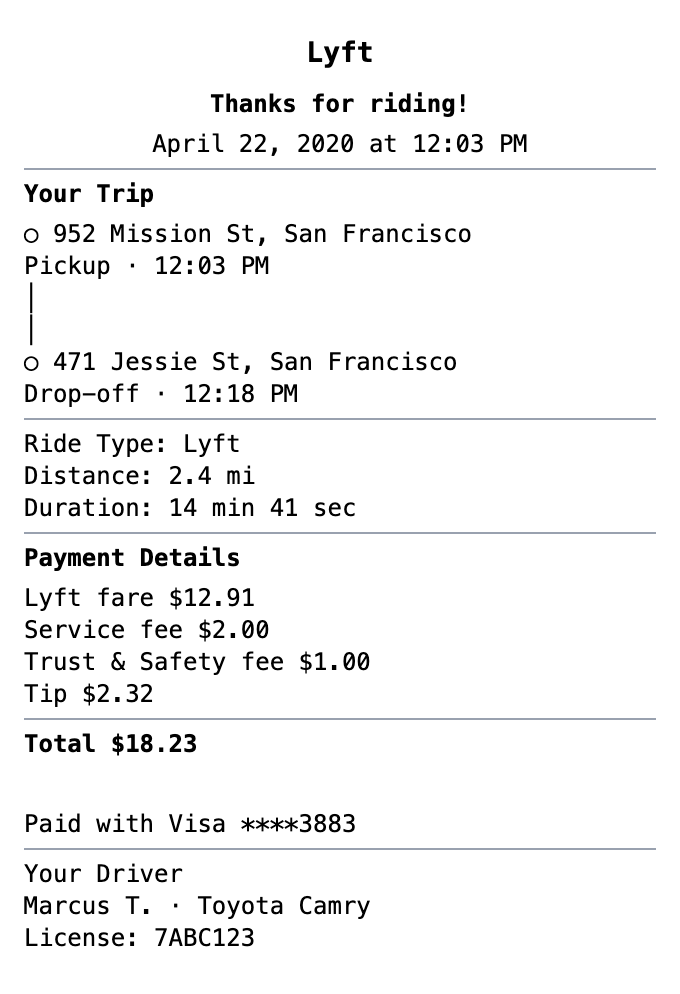
Generate Lyft-style ride receipts featuring trip details, fare breakdowns, driver info, and pickup/dropoff locations. Ideal for expense reports.
Start Your Lyft Receipt
Zero to Lyft Receipt in 60 Seconds
Fonts, spacing, and layout are modeled on the real thing, so your export holds up.
Trip Route
Show pickup and dropoff locations with timestamps just like the Lyft app.
Fare Details
Display fare with distance and duration for expense documentation.
Tip Display
Show tip amount separately from the base fare.
Payment Method
Display card ending digits for payment verification.
Clean Mobile Format
Matches the exact layout of Lyft app ride receipts.
Expense Ready
Perfect format for business expense documentation and reimbursement.
How to Generate Your Lyft Receipt
Three simple steps to generate professional receipts
Step 1:
Open the template
Step 2:
Edit every field
Step 3:
Download your file
When You Might Need One
From bookkeeping to mockups, it covers a lot of ground
Expense Reports
Document business expenses for company reimbursement
Tax Documentation
Keep organized records for tax filing and deductions
Client Invoicing
Create professional receipts for client billing
Proof of Purchase
Generate records for warranties and returns
Budget Tracking
Monitor spending with organized receipt records
Reimbursements
Submit clear expense documentation for refunds
Questions People Ask
Quick answers about this template
Is MakeMyReceipt free to use?
Yes. You can build and customize receipts for free with no sign-up required. Watermark-free exports and saved receipts are available with Pro.
What file formats can I export?
You can export your receipts as PNG (high-quality images), PDF (print-ready documents), or JPEG (compressed images for smaller file sizes).
You Might Also Need

Uber Receipt
Rideshare receipt with trip details, fare breakdown, driver info, and route information. Perfect for ride-hailing services.
Taxi Receipt
Taxi/cab ride receipt with fare breakdown
Car Rental Receipt
Vehicle rental receipt with rental period and fees

Airline Receipt
Flight ticket or airline service receipt

Parking Receipt
Parking garage or lot receipt