
Gas Station Receipt Generator
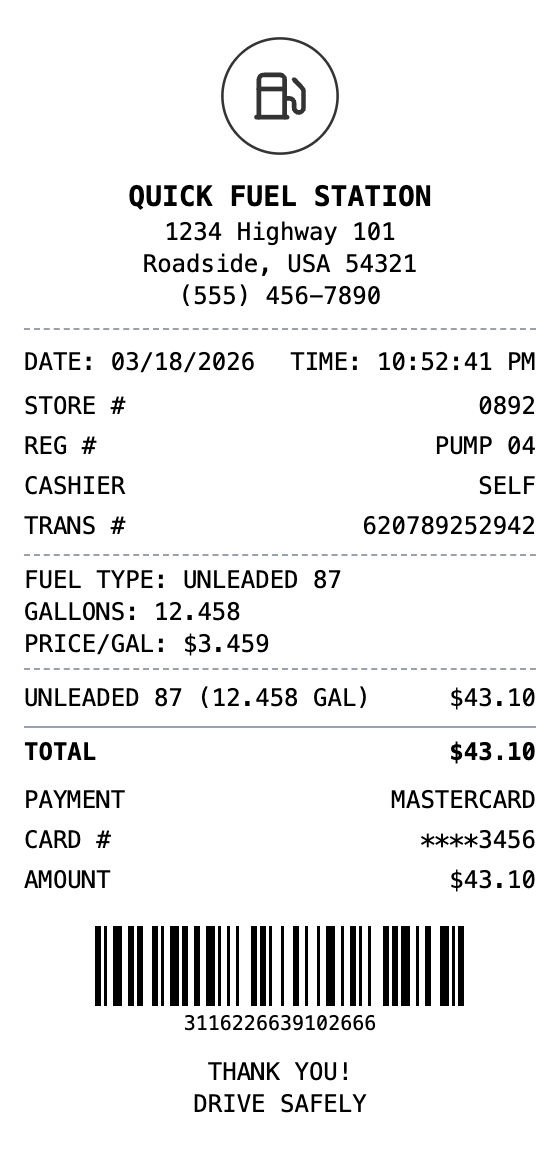
Generate gas station receipts with fuel type, gallons, price per gallon, and pump info. Or, customize to fit what you need on there. Perfect for expense reporting and reimbursements.
Generate Your Gas Station Receipt
Zero to Gas Station Receipt in 60 Seconds
Every detail is editable, from the header at the top down to the barcode.
Drag & Drop Builder
Set up fuel type, gallons, price per gallon, and pump number just like receipts from the gas station.
Real-time Preview
Watch your fuel receipt update as you add gallons pumped, total cost, and payment details.
Multiple Export Formats
Download as PDF for mileage logs, PNG for quick expense tracking, or JPEG for records.
Custom Styling
Include station name, pump number, fuel grade, and format it like real fuel receipts.
Barcode & QR Support
Add transaction barcodes or QR codes for loyalty point tracking and payment verification.
Paper Styles
Choose thermal paper for authentic pump receipt style or white for expense documentation.
Making Your Gas Station Receipt, Step by Step
Pick, edit, download. That's the entire workflow.
Step 1:
Pick your template
Step 2:
Fill in the details
Step 3:
Export your receipt
Common Uses for a Gas Station Receipt
A few of the ways people put this template to work
Mileage Reimbursement
Document fuel purchases for business mileage reimbursement claims
Fleet Management
Track fuel expenses across a fleet of company vehicles
Tax Deductions
Maintain gas receipts for self-employed vehicle expense deductions
Rideshare Drivers
Record fuel costs for Uber, Lyft, or delivery driver tax filings
Fuel Economy Tracking
Track gallons and mileage to monitor vehicle fuel efficiency
Corporate Card Reconciliation
Match fuel receipts to corporate credit card statements
Gas Station Receipt FAQs
Everything else you might want to know
How do I show fuel type and gallons on the receipt?
Use a custom message section to display the fuel type (e.g., UNLEADED 87), gallons pumped, and price per gallon. Then add the total fuel cost as a line item in the items list.
Is sales tax included in gas receipts?
Federal and state fuel taxes are already included in the per-gallon price at the pump, so gas receipts typically show 0% additional sales tax. Our template defaults to this.
Can I include pump and station numbers?
Yes, use the transaction info section to add pump number, store number, and transaction reference for a realistic gas station receipt format.
What is a gas station receipt?
A gas station receipt is a printed record from a fuel pump or station register documenting a gasoline or diesel purchase. It includes the station name and location, pump number, fuel type and grade (regular, mid-grade, premium, or diesel), number of gallons pumped, price per gallon, total cost, and payment method. Many receipts also include the date, time, and a barcode or transaction number for loyalty programs.
When would you need a gas station receipt?
Gas receipts are critical for mileage reimbursement in business travel, fleet fuel expense tracking, and tax deductions for self-employed individuals who use vehicles for work. Companies with vehicle fleets need gas receipts to monitor fuel spending per vehicle. They are also useful for tracking fuel economy, proving business mileage for IRS audits, and documenting fuel costs for rideshare drivers.
What information goes on a gas station receipt?
Gas station name and location • Pump number and fuel type/grade • Number of gallons and price per gallon • Total fuel cost • Date, time, and transaction number • Payment method and card details
Getting the details right on your gas station receipt
Use the custom message section for fuel-specific details like grade, gallons, and price per gallon • Include the pump number in the transaction info section for realism • Set tax to 0% since fuel taxes are already included in the per-gallon price • Add the station store number for corporate fleet tracking purposes
Is MakeMyReceipt free to use?
Yes. You can build and customize receipts for free with no sign-up required. Watermark-free exports and saved receipts are available with Pro.
What file formats can I export?
You can export your receipts as PNG (high-quality images), PDF (print-ready documents), or JPEG (compressed images for smaller file sizes).
Related Receipt Templates

Sheetz Receipt
Gas station and convenience store receipt
Auto Service Receipt
Auto shop receipt with services, parts, and labor
Oil Change Receipt
Oil change service receipt with vehicle info
Car Wash Receipt
Car wash service receipt

Convenience Store Receipt
Standard retail receipt with items, tax, and payment