
GOAT Receipt Generator
Generate GOAT order confirmation receipts with product details, authentication info, and pricing breakdowns.
Start Your GOAT Receipt
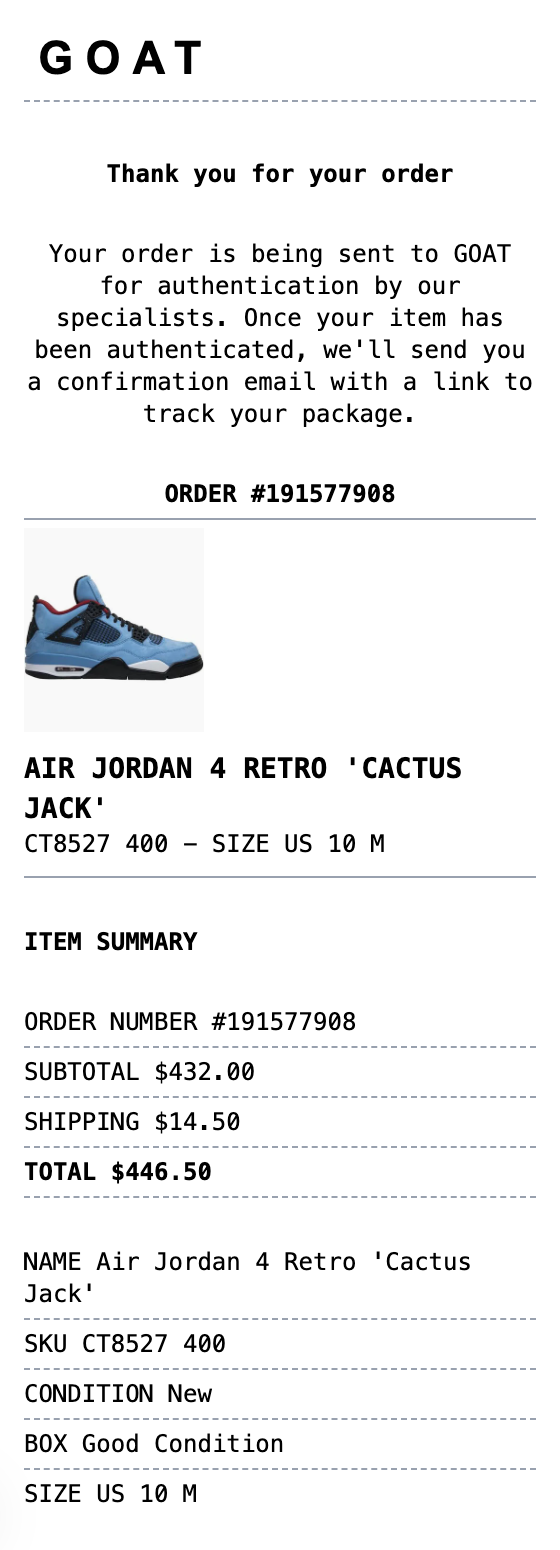
The Quick Way to Build a GOAT Receipt
No design software and no learning curve. Fill in your details and download.
Email-Style Layout
Authentic GOAT order confirmation format with product image display, order details, and authentication messaging.
Product Image Upload
Upload any sneaker or streetwear product photo directly into the receipt for a realistic order confirmation.
Authentication Details
Include GOAT's signature authentication messaging and order tracking information.
Item Summary Section
Display product name, SKU, condition, box status, and sizing details in the familiar GOAT format.
Pricing Breakdown
Show subtotal, shipping, tax, and total paid in the clean GOAT pricing layout.
Multiple Export Formats
Download as PNG for sharing, PDF for records, or JPEG for quick screenshots.
How to Generate Your GOAT Receipt
Three simple steps to generate professional receipts
Step 1:
Open the template
Step 2:
Edit every field
Step 3:
Download your file
What a Real GOAT Receipt Includes
Get these fields right and your goat receipt will read like the original.
- Order number
- The unique reference GOAT assigns to each order, used for support, tracking, and any verification questions.
- Item details
- The sneaker or item name, colorway, SKU or style code, and size. The style code is the reference collectors use to identify an exact release.
- Condition line
- Whether the item is new, used, or new with defects, since GOAT sells across conditions and the receipt reflects it.
- Price breakdown
- The item price plus shipping and any applicable tax, totaled as the amount charged.
- Verification note
- GOAT authenticates most items before they ship to the buyer, and the confirmation reflects the item passed review.
- Shipping details
- The delivery address and estimated arrival, which matter for tracking resale timelines and returns windows.
When You Might Need One
From bookkeeping to mockups, it covers a lot of ground
Purchase Records
Keep organized records of sneaker and streetwear purchases from GOAT.
Authentication Proof
Document authenticated purchases with order details and verification status.
Social Media
Share your latest pickup with a clean order confirmation screenshot.
Collection Tracking
Maintain receipts for your sneaker collection with detailed product information.
Expense Reports
Use for expense tracking or reimbursement documentation.
Resale Documentation
Provide proof of purchase and authentication for resale transactions.
Questions People Ask
Quick answers about this template
What is a GOAT order confirmation?
A GOAT order confirmation is an email receipt sent after purchasing sneakers or streetwear through the GOAT marketplace. It includes the order number, product details (name, SKU, condition, size), pricing breakdown, and information about GOAT's authentication process.
Can I upload my own product image?
Yes! Click the image placeholder area in the receipt to upload any product photo. This works great for sneakers, clothing, and accessories. The image will be embedded directly into your receipt.
What details are included in a GOAT receipt?
A typical GOAT receipt includes the order number, product image, item name, SKU number, condition (New/Used), box condition, size, and a full pricing breakdown with subtotal, shipping, tax, and total paid.
What is a goat receipt?
A GOAT receipt is an order confirmation from the GOAT sneaker and streetwear marketplace. GOAT is known for its authentication process where items are verified by specialists before being shipped to buyers. The order confirmation includes product details, pricing breakdown, and authentication status information.
Why would you recreate a goat receipt?
GOAT order confirmations serve as proof of purchase for authenticated sneakers and streetwear items. They are commonly used for personal records, resale documentation, insurance claims, and verifying product authenticity. The email-style format includes detailed item information like SKU numbers, condition, and sizing.
Which fields matter most on a goat receipt?
Order number and date • Product image • Item name, SKU, and style number • Condition and box status • Size information • Subtotal, shipping, tax, and total • Authentication status message
Tips for creating your goat receipt
Upload a clear product image for the most realistic result - shoe photos work best against a white background. • Use the sans-serif font and white paper style for the authentic GOAT email look. • Include accurate SKU numbers and sizing for realistic product details. • Keep the authentication message to match GOAT's standard verification language.
Is MakeMyReceipt free to use?
Yes. You can build and customize receipts for free with no sign-up required. Watermark-free exports and saved receipts are available with Pro.
What file formats can I export?
You can export your receipts as PNG (high-quality images), PDF (print-ready documents), or JPEG (compressed images for smaller file sizes).
You Might Also Need

StockX Receipt
Use our sneaker marketplace StockX receipt with product details and authentication

Grailed Receipt
Luxury resale marketplace receipt with shipping details
Nike Receipt
Sports retail receipt with detailed return policy
Shoes Receipt
Shoe store receipt with sizes, styles, and return policy

Balenciaga Receipt
Luxury fashion receipt with sales tax analysis