
Donation Receipt Generator
Generate professional donation receipts for tax-deductible contributions. Include donor info, amount, and organization details. Perfect for nonprofits.
Create Your Donation Receipt
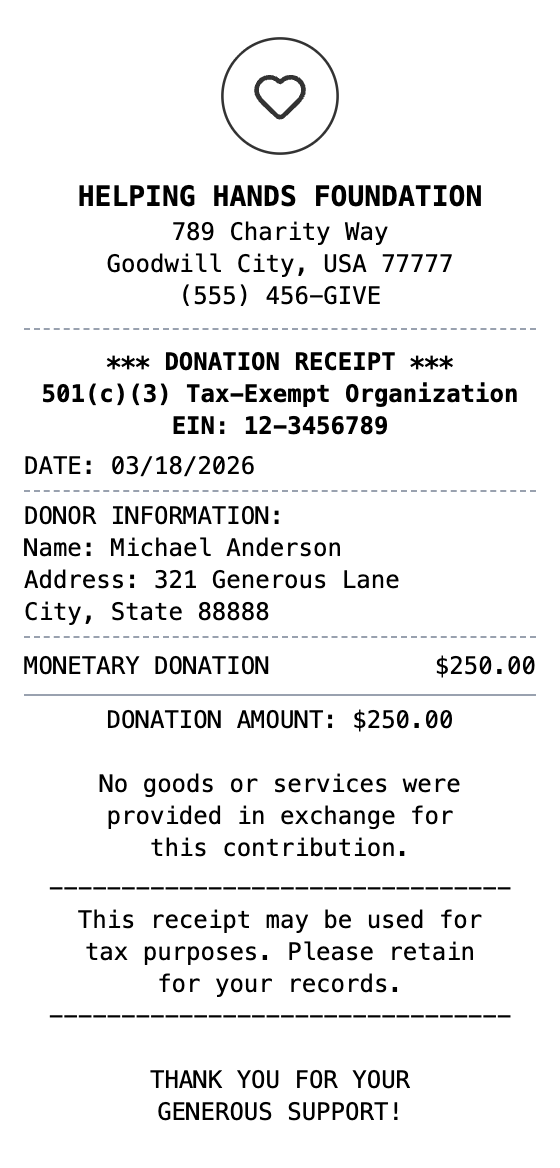
The Quick Way to Build a Donation Receipt
Pick a template, make it your own, and download a donation receipt that looks the part. No design skills needed.
Drag & Drop Builder
Arrange donor info, donation amount, and tax-deductible statements in proper charitable receipt format.
Real-time Preview
See your donation receipt update as you add contribution details, dates, and organization info.
Multiple Export Formats
Download as PDF for tax records, PNG for quick sharing, or JPEG for donor acknowledgment.
Custom Styling
Include nonprofit name, EIN number, and format it for official tax documentation.
Barcode & QR Support
Add donation barcodes or QR codes linking to your organization's giving page.
Paper Styles
Choose white paper for professional tax documents or thermal for event donations.
How to Make a Donation Receipt
The whole process takes about a minute
Step 1:
Start from this template
Step 2:
Make it yours
Step 3:
Save and download
Where a Donation Receipt Comes in Handy
Real situations where this template gets used
Nonprofit Compliance
Issue IRS-compliant donation receipts to all contributors
Donor Tax Deductions
Provide donors with proper documentation for charitable tax deductions
Fundraising Records
Track all donations received for annual fundraising reports
Grant Documentation
Maintain contribution records for grant applications and audits
Year-End Statements
Generate annual giving summaries for donors at tax time
School Fundraisers
Create receipts for school, church, or community organization donations
Common Questions, Answered
The details people usually ask about
When is a donation receipt required for taxes?
The IRS requires a written acknowledgment for any single charitable contribution of $250 or more. However, issuing receipts for all donation amounts is best practice and helps donors with their record-keeping.
What must a donation receipt include for IRS compliance?
A tax-compliant donation receipt must include the organization name and EIN, donor name, date and amount, and a statement about whether goods or services were provided in exchange for the donation.
Can I create donation receipts for non-cash donations?
Yes, describe the donated items in the receipt but do not assign a dollar value. The donor is responsible for determining fair market value for tax purposes.
What is a donation receipt?
A donation receipt is an official acknowledgment issued by a nonprofit organization confirming a charitable contribution. The IRS requires written acknowledgment for any single donation of $250 or more, and best practice is to issue receipts for all amounts. A proper donation receipt includes the organization's name and EIN (Employer Identification Number), donor name, date and amount of contribution, a statement of whether goods or services were provided in exchange, and a description of any non-cash donations.
When would you need a donation receipt?
Donation receipts are legally required for donors to claim charitable tax deductions on their federal tax returns. Without a proper receipt, the IRS can disallow the deduction during an audit. Nonprofits must issue them to maintain compliance with IRS regulations and to build donor trust. They are also essential for year-end tax summaries, grant reporting, and maintaining accurate fundraising records.
Which fields matter most on a donation receipt?
Nonprofit organization name and address • EIN (Employer Identification Number) • Donor name and address • Date of donation and amount contributed • Statement that no goods or services were exchanged • Description of non-cash donations if applicable • Tax-deductibility statement
How to make your donation receipt look right
Always include the organization's EIN number -- donors need it for tax filing • Add the required IRS statement: "No goods or services were provided in exchange for this contribution" • Include a note that the receipt should be retained for tax purposes • For non-cash donations, describe the items donated but do not assign a dollar value (the donor determines fair market value)
Is MakeMyReceipt free to use?
Yes. You can build and customize receipts for free with no sign-up required. Watermark-free exports and saved receipts are available with Pro.
What file formats can I export?
You can export your receipts as PNG (high-quality images), PDF (print-ready documents), or JPEG (compressed images for smaller file sizes).
Similar Receipt Templates
Cash Receipt
Simple cash payment receipt
Money Transfer Receipt
Wire transfer or money transfer receipt
Expense Receipt
Business expense receipt for reimbursement
PayPal Receipt
Digital payment receipt with transaction ID, sender/receiver info, and payment confirmation details.
Itemized Receipt
Detailed itemized receipt with line items