
Hotel Receipt Generator
Generate hotel receipts that work for big chains or boutique hotels, with every detail you need like room charges, amenities, taxes, and guest info. Perfect for hotels, motels, and lodging businesses.
Create Your Hotel Receipt
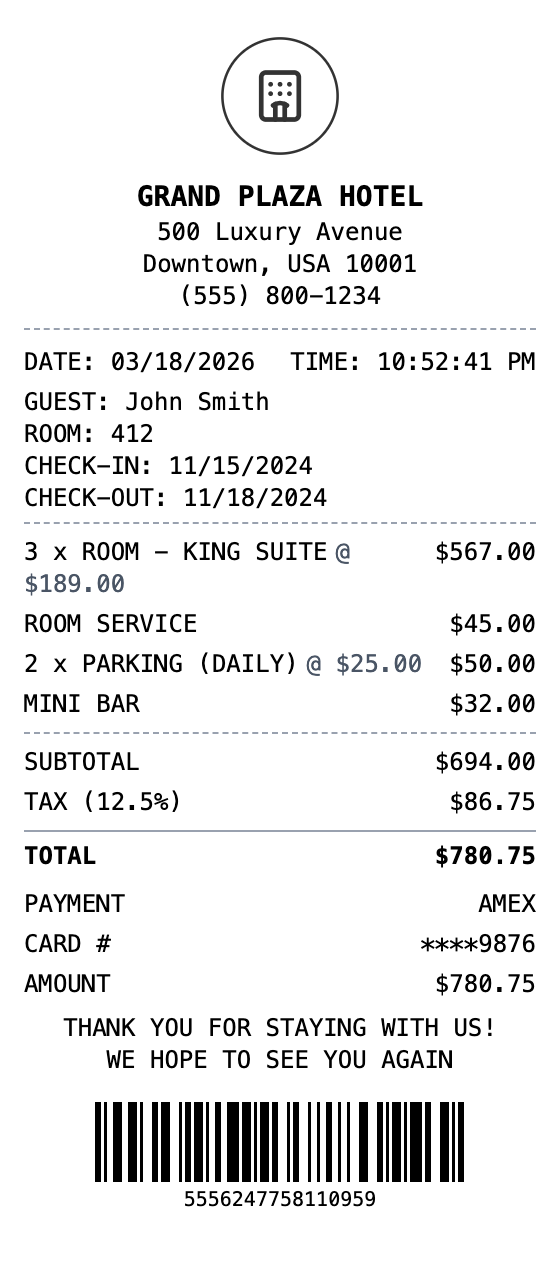
The Quick Way to Build a Hotel Receipt
No design software and no learning curve. Fill in your details and download.
Drag & Drop Builder
Arrange room charges, resort fees, dining, and amenities in the same format hotels use for guest folios.
Real-time Preview
See your hotel receipt update as you add nights, room service charges, and incidentals.
Multiple Export Formats
Download as PDF for expense reports, PNG for quick sharing, or JPEG for travel records.
Custom Styling
Include hotel name, guest details, check-in/out dates, and format it like professional hotel invoices.
Barcode & QR Support
Add confirmation barcodes or QR codes linking to booking details and loyalty programs.
Paper Styles
Choose white paper for professional folios or thermal for front desk receipt style.
How to Make a Hotel Receipt
The whole process takes about a minute
Step 1:
Start from this template
Step 2:
Make it yours
Step 3:
Save and download
Where a Hotel Receipt Comes in Handy
Real situations where this template gets used
Business Travel Expenses
Submit hotel folios for corporate travel reimbursement
Tax Documentation
Maintain hotel receipts for business trip tax deductions
Hotel Operations
Generate guest folios when your property management system is offline
Travel Records
Keep organized accommodation records for frequent travel
Event Planning
Document hotel charges for conferences and corporate events
Hospitality Design
Create folio mockups for hotel booking apps or management software
Common Questions, Answered
The details people usually ask about
What is a hotel folio receipt?
A hotel folio is the complete itemized invoice for a guest's stay, including room charges, taxes, incidentals, and total payment. Our hotel receipt template lets you create one with all these details.
How do I show multiple nights on the receipt?
Add each night as a separate line item (e.g., "ROOM - KING SUITE" with quantity 3 for a 3-night stay), or list each date individually for different room rates.
Can I include resort fees and occupancy tax?
Yes, add resort fees as a line item in the items list, and set the tax rate to match your local hotel occupancy tax. You can also add a custom message section for additional tax breakdowns.
What does a hotel receipt show?
A hotel receipt (also called a hotel folio or guest invoice) is an itemized bill provided at checkout that details all charges incurred during a guest's stay. It includes room rates per night, resort or destination fees, room service charges, minibar purchases, parking fees, spa services, and applicable taxes like occupancy tax and tourism levies. Hotels issue these as proof of payment for guest records.
Why do you need a hotel receipt?
Hotel receipts are among the most commonly required documents for business travel expense reports. Companies require itemized hotel folios to reimburse employees for lodging, and travelers need them for tax deductions on business trips. They are also necessary for corporate travel audits, insurance claims for trip cancellations, and resolving credit card billing disputes after a stay.
What are the key fields on a hotel receipt?
Hotel name, address, and reservation confirmation number • Guest name and check-in/check-out dates • Room type and nightly rate • Itemized incidental charges (room service, parking, minibar) • Occupancy tax, resort fees, and tourism levies • Total amount and payment method
How to make your hotel receipt look right
Include check-in and check-out dates in the custom message or transaction info section • List each night as a separate line item for multi-night stays • Set the tax rate to your local occupancy tax rate (typically 10-15%) • Add resort or destination fees as a separate line item
Is MakeMyReceipt free to use?
Yes. You can build and customize receipts for free with no sign-up required. Watermark-free exports and saved receipts are available with Pro.
What file formats can I export?
You can export your receipts as PNG (high-quality images), PDF (print-ready documents), or JPEG (compressed images for smaller file sizes).
Similar Receipt Templates

Hilton Receipt
Premium hotel folio receipt with room charges and guest details
Days Inn Receipt
Hotel receipt with room charges and guest folio

Motel 6 Receipt
Budget-friendly motel receipt with simple room charges

Red Roof Inn Receipt
Economy hotel receipt with room charges and guest info
Airbnb Receipt
Vacation rental receipt with booking details, nightly rates, cleaning fees, and host information.